Launching a website is one of the most important steps for any individual, startup, business, organization, or blogger looking to establish an online presence. However, many first-time website owners quickly discover that building a website is only one part of the journey. Managing hosting, emails, databases, files, backups, domains, and security can feel overwhelming, especially if you have little or no technical experience.
Fortunately, modern web hosting control panels have made website management much simpler than it used to be. One of the most beginner-friendly solutions available today is DirectAdmin.
DirectAdmin is a lightweight, powerful, and easy-to-use web hosting control panel designed to help users manage websites without needing advanced server administration skills. Whether you're launching your first WordPress website, creating an online portfolio, running a business website, or hosting multiple domains, DirectAdmin provides an intuitive interface that makes managing your hosting account straightforward.
Unlike many complicated server management tools, DirectAdmin focuses on speed, simplicity, reliability, and efficiency. It gives you complete control over your hosting environment while keeping everything organized in an easy-to-understand dashboard.
At SIRSTEVEHQ, we provide reliable DirectAdmin Hosting designed for beginners, developers, businesses, agencies, and growing websites. Our DirectAdmin Hosting combines powerful infrastructure with an easy-to-use control panel, allowing you to focus on growing your website instead of worrying about server management.
In this comprehensive beginner's guide, you'll learn everything you need to know about DirectAdmin Hosting, including what it is, how it works, its key features, why it's becoming increasingly popular, and how you can use it to manage your website confidently—even if you've never used web hosting before.
What Is DirectAdmin?
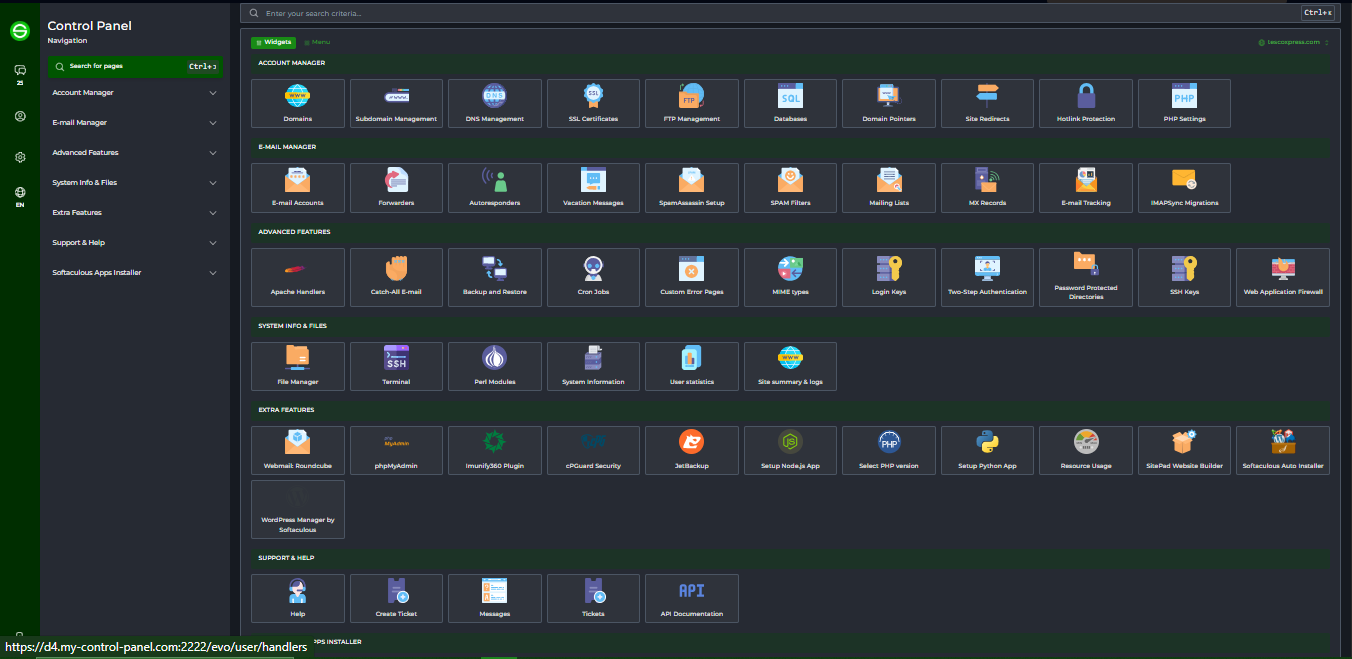
DirectAdmin is a web hosting control panel that allows users to manage every aspect of their hosting account through a graphical interface instead of using complicated Linux command lines.
Think of DirectAdmin as the "control center" for your website.
Instead of typing technical server commands, DirectAdmin allows you to:
- Upload website files
- Create email accounts
- Manage domains
- Install SSL certificates
- Create databases
- Manage backups
- Monitor website usage
- Configure DNS records
- Install applications like WordPress
—all from a clean web-based dashboard.
For beginners, this means you don't need to learn Linux server administration before launching your website.
What Is DirectAdmin Hosting?
DirectAdmin Hosting is a web hosting service where the hosting account is managed using the DirectAdmin control panel.
When you purchase a DirectAdmin Hosting plan from SIRSTEVEHQ, you receive access to a hosting account that includes the DirectAdmin dashboard.
Inside this dashboard, you can manage nearly everything related to your website without needing technical expertise.
Instead of contacting support every time you need to create an email account or upload files, DirectAdmin gives you the tools to do these tasks yourself in just a few clicks.
Why Is DirectAdmin Becoming More Popular?
Over the past few years, DirectAdmin has experienced significant growth among hosting providers worldwide.
Several factors have contributed to its increasing popularity.
1. Lightweight Performance
DirectAdmin consumes fewer server resources compared to many other hosting control panels.
Because it uses less memory and CPU power, servers can perform more efficiently.
This often translates into:
- Faster page loading
- Better server responsiveness
- Improved hosting performance
- More efficient resource utilization
For website owners, this means a smoother experience when managing websites.
2. Beginner-Friendly Interface
One of DirectAdmin's strongest advantages is its clean interface.
Unlike some control panels filled with dozens of menus and advanced options, DirectAdmin organizes features logically.
Even someone launching their very first website can quickly learn where to find:
- File Manager
- Email Accounts
- Databases
- Domains
- SSL Certificates
- Backups
The interface avoids unnecessary complexity while still providing powerful features.
3. Faster Navigation
DirectAdmin was designed with speed in mind.
Pages load quickly, settings are easy to locate, and common tasks require only a few clicks.
This saves time for beginners and professionals alike.
4. Stable Development
DirectAdmin has been continuously developed for many years.
It receives regular updates that improve:
- Security
- Compatibility
- Performance
- User experience
- New features
This makes it a dependable platform for hosting providers and customers alike.
5. Excellent Value
DirectAdmin allows hosting providers to offer high-quality hosting at competitive prices.
The result is affordable hosting plans without sacrificing reliability or essential features.
Who Should Use DirectAdmin Hosting?
DirectAdmin is suitable for nearly every type of website owner.
Beginners
If you've never managed a website before, DirectAdmin provides one of the easiest learning experiences available.
Its simple dashboard reduces confusion and helps you become comfortable with website management quickly.
Bloggers
Whether you're running a personal blog or a professional content website, DirectAdmin includes everything you need:
- WordPress installation
- Email management
- SSL certificates
- File uploads
- Backups
Small Businesses
Business owners need reliable hosting without hiring a server administrator.
DirectAdmin simplifies everyday tasks such as:
- Creating company email addresses
- Managing domains
- Updating website files
- Monitoring storage usage
Freelancers
Freelancers building websites for clients can efficiently manage multiple websites through DirectAdmin.
Developers
Although DirectAdmin is beginner-friendly, it also provides advanced tools that developers appreciate.
These include:
- SSH access (where available)
- Git support (depending on hosting plan)
- Cron Jobs
- PHP version selection
- Multiple PHP configurations
- Database management
Agencies
Marketing agencies and web development companies can use DirectAdmin to manage multiple client websites from one hosting account.
Understanding the DirectAdmin Dashboard
When you log into your hosting account, you'll be welcomed by the DirectAdmin dashboard.
Everything is organized into logical sections.
Some of the most commonly used areas include:
Account Manager
This section contains settings related to your hosting account.
Here you can manage:
- Domains
- Subdomains
- FTP Accounts
- DNS Management
- Email Accounts
System Information
This area displays useful information such as:
- Disk usage
- Bandwidth usage
- Hosting package limits
- Server statistics
Monitoring these helps you understand your website's resource consumption.
File Manager
The File Manager is where you'll spend much of your time.
It allows you to:
- Upload website files
- Delete files
- Rename folders
- Compress files
- Extract ZIP archives
- Edit website code
- Change permissions
For beginners, this eliminates the need for separate FTP software in many situations.
Email Manager
Professional email addresses build trust.
Instead of using free email services, you can create addresses like:
DirectAdmin makes email management incredibly straightforward.
You can:
- Create new mailboxes
- Change passwords
- Configure forwarding
- Set autoresponders
- Manage spam filtering
MySQL Management
Most modern websites rely on databases.
For example:
- WordPress
- Joomla
- Drupal
- Magento
- Laravel applications
All require databases.
DirectAdmin allows you to:
- Create databases
- Create database users
- Assign permissions
- Access phpMyAdmin
- Manage backups
No command-line knowledge is required.
SSL Certificates
Website security is essential.
Visitors expect to see the secure padlock icon in their browser.
DirectAdmin simplifies SSL installation.
Many hosting providers, including SIRSTEVEHQ, offer free SSL certificates that can be installed with just a few clicks.
SSL helps:
- Encrypt visitor data
- Improve trust
- Increase SEO rankings
- Protect login information
Managing Files in DirectAdmin
Every website consists of files.
These may include:
- HTML
- CSS
- JavaScript
- Images
- Videos
- PHP files
- WordPress files
Using DirectAdmin's File Manager, you can upload these files directly to your hosting account.
The interface resembles the folder system on your computer, making it easy for beginners to understand.
You can:
- Drag and drop files
- Create folders
- Move files
- Delete unnecessary files
- Upload ZIP archives
- Extract compressed files
- Edit configuration files
This makes publishing a website significantly easier.
Creating Professional Email Addresses
One of the first things new business owners do after purchasing hosting is create professional email addresses.
Instead of:
yourbusiness@gmail.com
You can use:
Professional email addresses increase credibility and improve brand recognition.
Within DirectAdmin, creating a mailbox typically takes less than a minute.
You simply choose:
- Username
- Password
- Storage quota
Your mailbox is immediately ready to use with webmail or email applications like Outlook and Thunderbird.
Managing Domains and Subdomains
DirectAdmin makes it easy to organize multiple websites.
You can manage:
- Primary domains
- Addon domains
- Subdomains
- Domain aliases
For example:
- yourdomain.com
- blog.yourdomain.com
- shop.yourdomain.com
- support.yourdomain.com
Each can serve different purposes while being managed from one convenient dashboard.
Installing WordPress on DirectAdmin
One of the biggest reasons people purchase web hosting is to build a WordPress website. WordPress powers millions of websites worldwide, ranging from personal blogs to eCommerce stores, business websites, news platforms, and educational portals.
The good news is that DirectAdmin makes installing WordPress incredibly simple.
Depending on your hosting provider, you may have access to a one-click application installer such as Softaculous. This allows you to install WordPress in just a few minutes without manually downloading files or creating databases.
The typical installation process involves:
- Logging in to DirectAdmin.
- Opening the application installer.
- Selecting WordPress.
- Choosing the domain where you want WordPress installed.
- Entering your website name and administrator credentials.
- Clicking Install.
Within a few minutes, your website is ready.
If you prefer a manual installation, DirectAdmin also provides all the tools required, including File Manager, MySQL Database creation, and phpMyAdmin.
This flexibility makes DirectAdmin suitable for both beginners and experienced developers.
Understanding Databases
Many first-time website owners hear the term database and assume it is something highly technical.
In reality, a database is simply a structured place where your website stores information.
For example, WordPress stores:
- Blog posts
- Pages
- Comments
- User accounts
- Website settings
- Plugin configurations
- Theme options
Without a database, most dynamic websites would not function properly.
DirectAdmin simplifies database management through an intuitive interface where you can:
- Create new databases
- Create database users
- Assign strong passwords
- Manage permissions
- Access phpMyAdmin
- Delete unused databases
Unless you're troubleshooting or developing a custom application, you may rarely need to interact directly with your database.
What Is phpMyAdmin?
phpMyAdmin is a browser-based tool included with most DirectAdmin hosting plans.
It allows you to manage MySQL or MariaDB databases without using command-line tools.
Using phpMyAdmin, you can:
- View database tables
- Import SQL files
- Export backups
- Edit records
- Run SQL queries
- Repair damaged tables
- Optimize databases
While beginners may not use phpMyAdmin often, it's a valuable tool for developers and advanced users.
Managing FTP Accounts
Although the File Manager is convenient, many users prefer uploading large files through FTP (File Transfer Protocol).
DirectAdmin allows you to create multiple FTP accounts.
This is particularly useful when:
- Working with web developers
- Hiring freelancers
- Managing multiple websites
- Restricting access to specific directories
Instead of sharing your main hosting login, you can create a dedicated FTP account with limited permissions.
This improves both security and organization.
DNS Management Made Easy
Every domain name relies on DNS (Domain Name System) records to tell browsers where your website and email services are located.
DirectAdmin includes a built-in DNS Management section where you can edit common DNS records.
Some of the most common record types include:
A Record
Points your domain or subdomain to an IPv4 server address.
Example:
example.com → 192.0.2.1
AAAA Record
Similar to an A Record but used for IPv6 addresses.
CNAME Record
Creates an alias from one hostname to another.
Example:
blog.example.com → example.com
MX Record
Directs incoming email to the correct mail server.
Without proper MX records, your email may not function correctly.
TXT Record
TXT records are commonly used for:
- Domain verification
- SPF
- DKIM
- DMARC
- Email authentication
- Third-party services
NS Record
Nameserver records specify which DNS servers are authoritative for your domain.
Most users rarely need to modify these after their hosting account is configured.
Understanding SSL Certificates
If you've noticed the small padlock icon next to a website's address, you've seen an SSL certificate in action.
SSL (Secure Sockets Layer) encrypts communication between your visitors and your website.
Without SSL, sensitive information such as passwords, contact forms, and payment details could be intercepted.
Benefits of SSL include:
- Improved visitor trust
- Better search engine rankings
- Secure data transmission
- Browser security indicators
- Compliance with modern web standards
Many hosting providers, including SIRSTEVEHQ, include free SSL certificates with DirectAdmin Hosting, making it easy to secure your website.
Creating Backups
One of the most important habits every website owner should develop is creating regular backups.
A backup is a copy of your website that can be restored if something goes wrong.
Problems that backups can protect you against include:
- Accidental file deletion
- Website hacking
- Plugin conflicts
- Server issues
- Failed updates
- Malware infections
DirectAdmin includes built-in backup functionality.
You can back up:
- Website files
- Databases
- Email accounts
- DNS settings
- Entire hosting accounts
Depending on your hosting plan, you may also have access to automated backups provided by your hosting provider.
Even with automated backups, it is wise to keep your own copies before making major changes.
Monitoring Resource Usage
Every hosting account has resource limits based on the hosting plan you've selected.
DirectAdmin allows you to monitor these resources from the dashboard.
Common metrics include:
- Disk usage
- Bandwidth usage
- Number of databases
- Email accounts
- FTP accounts
- Inodes (file count)
Monitoring your resource usage helps you identify when it's time to upgrade your hosting plan.
For example, if your website is growing rapidly and your storage is nearly full, upgrading early helps prevent service interruptions.
Managing Multiple Domains
As your online presence grows, you may own several domain names.
DirectAdmin makes it easy to manage multiple domains from a single account, depending on your hosting package.
For example, you might own:
- yourbusiness.com
- yourbusiness.ng
- yourblog.com
- yourportfolio.com
Instead of logging into different hosting accounts, DirectAdmin allows you to manage them from one centralized dashboard.
This saves time and simplifies website administration.
Cron Jobs Explained
Some website tasks need to run automatically.
Examples include:
- Sending scheduled emails
- Publishing scheduled content
- Cleaning temporary files
- Running backups
- Synchronizing data
- Executing maintenance scripts
These automated tasks are known as Cron Jobs.
DirectAdmin provides an easy interface for creating Cron Jobs without manually editing server configuration files.
Beginners may not need this feature immediately, but it's invaluable as your website grows.
Choosing the Right PHP Version
PHP is the programming language behind WordPress and many other popular content management systems.
Newer PHP versions generally offer:
- Better performance
- Improved security
- Faster execution
- New language features
DirectAdmin often allows users to select the PHP version for each website.
This is useful because some older applications require earlier PHP versions, while modern websites benefit from the latest supported releases.
Before changing your PHP version, ensure your website, theme, and plugins are compatible.
Managing Website Security
Website security should never be overlooked.
Even small websites can become targets for automated attacks.
DirectAdmin includes several features that help improve your website's security.
Some best practices include:
Use Strong Passwords
Avoid simple passwords like:
- password123
- admin123
- yourname2026
Instead, use long passwords containing uppercase letters, lowercase letters, numbers, and special characters.
Keep Software Updated
Always update:
- WordPress
- Plugins
- Themes
- PHP versions (when compatible)
Outdated software is one of the leading causes of website compromises.
Install SSL
Never operate a modern website without HTTPS encryption.
SSL protects both you and your visitors.
Remove Unused Applications
Delete plugins, themes, and applications that you no longer use.
Unused software can introduce unnecessary security risks.
Enable Spam Protection
If your website uses contact forms or email services, configure spam protection to reduce unwanted messages.
Perform Regular Backups
Security isn't only about prevention.
Being able to restore your website quickly after an issue is equally important.
Tips for First-Time DirectAdmin Users
If you're completely new to DirectAdmin, these tips will help you get started confidently:
- Take time to explore the dashboard before making changes.
- Learn what each menu does.
- Keep a backup before editing important files.
- Organize your folders properly.
- Use descriptive names for databases and email accounts.
- Monitor your hosting usage regularly.
- Enable SSL as soon as your website goes live.
- Delete unused files to keep your account organized.
- Use strong passwords for every account.
- Contact your hosting provider if you're unsure about any setting.
Remember, every experienced website administrator was once a beginner.
Common Mistakes Beginners Should Avoid
When managing your first website, it's easy to make mistakes. Fortunately, most are avoidable with a little knowledge.
Uploading Files to the Wrong Directory
Many beginners accidentally upload website files outside the correct web root directory, causing their site to display errors or appear blank.
Always ensure your website files are placed in the correct directory specified by your hosting provider.
Forgetting to Back Up Before Changes
Whether you're updating WordPress, changing themes, or editing configuration files, always create a backup first.
A backup can save hours of troubleshooting if something goes wrong.
Ignoring Security Updates
Running outdated software increases the risk of malware infections and security breaches.
Check for updates regularly and apply them after confirming compatibility.
Using Weak Passwords
Weak passwords make it easier for attackers to gain unauthorized access to your hosting account, email, or website.
Use unique, complex passwords for every account.
Deleting Important Files
If you're unsure about the purpose of a file, don't delete it. Research it first or contact your hosting provider for guidance.
DirectAdmin vs. cPanel: Which Control Panel Is Better?
When researching web hosting, one of the most common questions beginners ask is:
"Should I choose DirectAdmin or cPanel?"
We have written an article to compare these control panels.
The truth is that both DirectAdmin and cPanel are excellent hosting control panels. Each provides the tools you need to manage websites, email accounts, databases, domains, backups, and security.
For many first-time users, the best choice depends on your personal preferences, your hosting provider, and the features you need.
The table below compares some of the key differences.
| Feature |
DirectAdmin |
cPanel |
| Ease of Use |
Excellent |
Excellent |
| Beginner Friendly |
Yes |
Yes |
| Speed |
Very Fast |
Fast |
| Resource Usage |
Low |
Moderate |
| Interface |
Clean and Simple |
Feature-Rich |
| Website Management |
Excellent |
Excellent |
| Email Management |
Yes |
Yes |
| Database Management |
Yes |
Yes |
| SSL Management |
Yes |
Yes |
| DNS Management |
Yes |
Yes |
| Multiple Domain Support |
Yes |
Yes |
| Backup Management |
Yes |
Yes |
For many users, DirectAdmin's clean layout makes it easier to learn because there are fewer unnecessary menus and distractions. It focuses on the tools that website owners use most frequently, making navigation intuitive for beginners.
Why Beginners Love DirectAdmin
There are several reasons why DirectAdmin has become a popular choice among first-time website owners.
Easy to Learn
DirectAdmin organizes features into logical categories, allowing users to quickly find what they need.
Even if you've never used a hosting control panel before, you can become comfortable with DirectAdmin after spending just a short time exploring the interface.
Faster Interface
Because DirectAdmin is lightweight, pages load quickly and the dashboard feels responsive.
This creates a smoother experience when managing your website.
Less Clutter
Some hosting control panels present dozens of icons on the home screen, which can overwhelm beginners.
DirectAdmin focuses on simplicity by displaying the most important features in an organized manner.
Reliable Performance
A reliable control panel should work consistently without consuming excessive server resources.
DirectAdmin is known for being stable and efficient, helping hosting providers deliver dependable services.
Suitable for Growth
Although DirectAdmin is beginner-friendly, it also includes advanced features that become useful as your website grows.
This means you won't necessarily outgrow the platform as your skills improve.
How DirectAdmin Helps Different Types of Users
One of DirectAdmin's greatest strengths is its flexibility. It serves a wide range of users, each with different needs and experience levels.
Bloggers
If you're starting a personal or professional blog, DirectAdmin gives you everything you need to publish and maintain your content.
You can:
- Install WordPress
- Upload images
- Manage email accounts
- Create backups
- Secure your site with SSL
All without needing advanced technical knowledge.
Small Business Owners
Businesses often need a professional online presence without hiring a dedicated IT team.
DirectAdmin allows business owners to:
- Create branded email addresses
- Manage website files
- Monitor hosting resources
- Configure domains
- Maintain website security
This makes it easier to focus on running the business rather than managing servers.
Freelancers
Freelancers building websites for clients benefit from DirectAdmin's straightforward interface.
Tasks such as creating FTP accounts, managing databases, and configuring domains can be completed quickly, improving productivity.
Developers
Developers appreciate DirectAdmin because it offers access to tools like:
- Multiple PHP versions
- Cron Jobs
- SSH access (where available)
- Git integration (depending on the hosting environment)
- Database management
- File editing
This balance of simplicity and flexibility makes DirectAdmin suitable for both beginners and professionals.
Agencies
Agencies managing multiple client websites can organize domains, backups, email accounts, and resources from a centralized dashboard, reducing administrative overhead.
Performance Benefits of DirectAdmin Hosting
While the control panel itself does not determine your website's speed, it can influence how efficiently server resources are used.
Because DirectAdmin is lightweight, it typically consumes less memory and CPU than more resource-intensive alternatives.
This can provide several indirect benefits:
- Faster access to the hosting dashboard
- Reduced server overhead
- Better resource allocation
- Improved stability under normal workloads
Combined with high-quality hosting infrastructure, these efficiencies contribute to a smoother hosting experience.
Tips for Keeping Your DirectAdmin Hosting Account Organized
As your website grows, organization becomes increasingly important.
Here are some practical tips to keep your hosting account clean and manageable.
Create Meaningful Folder Structures
Organize website files into clearly named directories instead of storing everything in one location.
This makes future maintenance much easier.
Remove Old Backups
While backups are essential, keeping dozens of outdated backups on your hosting account can consume valuable storage space.
Download older backups to your local computer or cloud storage if you need to retain them long-term.
Delete Unused Email Accounts
If employees leave your organization or certain email addresses are no longer needed, remove or archive them to reduce clutter and improve security.
Monitor Disk Usage
Regularly check your storage usage from the DirectAdmin dashboard.
Large image files, backups, log files, and unused applications can consume storage without you realizing it.
Keep Software Updated
Maintaining updated applications reduces security risks and ensures compatibility with newer technologies.
Troubleshooting Common DirectAdmin Issues
Even with an intuitive control panel, you may occasionally encounter issues. Fortunately, many common problems have straightforward solutions.
My Website Isn't Loading
Possible causes include:
- Incorrect DNS settings
- Expired domain
- Missing website files
- PHP errors
- Incorrect document root
- DNS propagation after recent changes
Start by checking your domain's DNS records and confirming that your website files are in the correct directory.
I Can't Log In to DirectAdmin
If you cannot access the control panel:
- Verify your username and password.
- Ensure your internet connection is working.
- Clear your browser cache.
- Try a different browser or device.
- Contact your hosting provider if the issue persists.
Email Is Not Receiving Messages
Check the following:
- MX records
- Mailbox quota
- Spam filters
- Email client configuration
- DNS propagation if changes were recently made
SSL Certificate Shows Errors
Common reasons include:
- The certificate has expired.
- The domain points to the wrong server.
- Mixed content (HTTP resources on an HTTPS page).
- The SSL certificate has not yet been installed correctly.
Most SSL issues can be resolved by verifying your DNS settings and ensuring all website resources load over HTTPS.
WordPress Shows a White Screen
Often referred to as the "White Screen of Death," this issue is usually caused by:
- Plugin conflicts
- Theme errors
- PHP version incompatibility
- Exhausted PHP memory
Disabling recently installed plugins or switching to a default theme can often resolve the problem.
Best Practices for New Website Owners
Whether you're using DirectAdmin or another hosting control panel, these habits will help keep your website secure and reliable.
- Use strong, unique passwords.
- Enable two-factor authentication wherever possible.
- Keep WordPress, plugins, and themes updated.
- Remove unused software.
- Monitor your hosting account regularly.
- Perform backups before major changes.
- Install an SSL certificate.
- Use reputable plugins and themes.
- Avoid sharing your hosting login credentials unnecessarily.
- Contact your hosting provider whenever you're uncertain about a configuration.
Building good habits early will save you time and reduce the likelihood of future problems.
Why Choose SIRSTEVEHQ DirectAdmin Hosting?
Choosing the right hosting provider is just as important as choosing the right control panel.
At SIRSTEVEHQ, we've designed our DirectAdmin Hosting services to provide a smooth experience for beginners while delivering the performance and reliability that growing websites require.
When you choose SIRSTEVEHQ DirectAdmin Hosting, you benefit from:
User-Friendly Control Panel
Our DirectAdmin Hosting includes an intuitive control panel that makes website management simple, even if you're hosting your very first website.
High-Performance Infrastructure
Our hosting platform is built to deliver fast loading speeds, reliable uptime, and a stable environment for your website.
Free SSL Certificates
Secure your website with HTTPS to protect visitor data and build trust with your audience.
Professional Email Hosting
Create branded email addresses using your own domain name to present a more professional image for your business.
Reliable Backups
Protect your website against unexpected issues with backup options designed to help you recover your data quickly.
Expert Support
If you encounter any challenges, our support team is available to assist you with hosting-related questions and technical guidance.
Whether you're launching a personal blog, company website, online portfolio, or business platform, SIRSTEVEHQ DirectAdmin Hosting gives you the tools to manage your website confidently.
Frequently Asked Questions (FAQs)
Is DirectAdmin good for beginners?
Yes. DirectAdmin is designed with simplicity in mind, making it an excellent choice for beginners who want to manage their websites without learning complex server administration.
Can I install WordPress using DirectAdmin?
Yes. Most DirectAdmin hosting plans include a one-click installer that makes WordPress installation quick and straightforward.
Is DirectAdmin secure?
DirectAdmin includes features such as SSL management, password protection, user account controls, and regular software updates. Website security also depends on following best practices, such as using strong passwords and keeping applications updated.
Can I host multiple websites on DirectAdmin?
Yes. Depending on your hosting plan, you can manage multiple domains and websites from a single DirectAdmin account.
Does DirectAdmin support email hosting?
Yes. You can create professional email accounts using your domain name, manage forwarders, autoresponders, and access webmail.
Can I back up my website in DirectAdmin?
Yes. DirectAdmin provides tools for creating backups of website files, databases, email accounts, and other hosting data.
Do I need coding knowledge to use DirectAdmin?
No. Most everyday tasks can be completed through the graphical interface without writing code or using Linux commands.
Is DirectAdmin suitable for businesses?
Absolutely. Businesses of all sizes use DirectAdmin to manage websites, email accounts, databases, domains, and hosting resources efficiently.
Final Thoughts
Managing your first website doesn't have to be complicated.
DirectAdmin has earned its reputation as one of the most user-friendly hosting control panels available today by combining simplicity, speed, and powerful features into a clean, intuitive interface. Whether you're launching a blog, business website, portfolio, or online store, it provides all the essential tools you need to manage your hosting account with confidence.
From uploading files and creating professional email accounts to installing WordPress, managing databases, securing your website with SSL, and creating backups, DirectAdmin streamlines tasks that might otherwise seem intimidating to beginners.
As your website grows, DirectAdmin grows with you, offering advanced capabilities for developers and agencies while remaining approachable for first-time users.
At SIRSTEVEHQ, we're committed to making web hosting simple, reliable, and accessible. Our DirectAdmin Hosting plans are built to help individuals, entrepreneurs, and businesses get online quickly with dependable performance, robust security, and responsive support.
If you're looking for an easy-to-use hosting solution that removes the complexity from website management, SIRSTEVEHQ DirectAdmin Hosting is an excellent place to start your online journey.
We have written extensive guides about our DirectAdmin hosting in our knowledgebase. Click to read more about DirectAdmin hosting.














Comments (0)
No comments yet. Be the first to comment!