Unlike an unmanaged virtual private server (VPS) setup, our SIRSTEVEHQ Cloud platform is integrated into the SIRSTEVEHQ CP platform to make managing your new VPS and the sites on it as simple as possible.
Everything can be handled from our control panel, from the installation of new software using our one-click installers to adding new websites to the setup. You can get started right away – there’s no need to go about connecting via SSH or setting up software using guides online, meaning you can focus on what you’d actually like to do with your hosting instead.
Installing software
Firstly, before you add any sites to your SIRSTEVEHQ Cloud, you may want to add some specific software. Django, NodeJS, Ruby on Rails and Redis are just a few of the one-click installations available to our customers via the Manage Server area. You can even tweak the server itself to be optimised for Magento or WordPress sites.
To do this:
- After logging in, head to the Cloud server section of the control panel
- After selecting 'Manage', a list of applications and software will be presented.
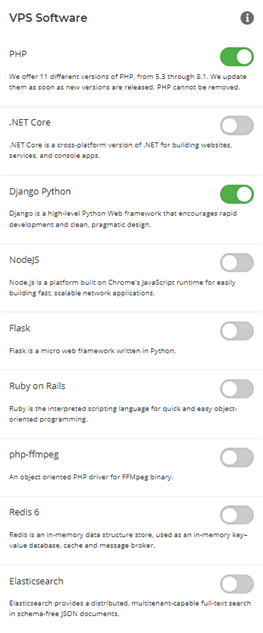
- From this point, use the toggles to choose which software you’d like to install
Note: To optimise your Cloud Server for WordPress or Magento, the server cannot have any sites currently on it.
Moving an existing site
If you have a pre-existing website on our Cloud or WordPress hosting that you’d like to move across to your new SIRSTEVEHQ Cloud instead, you can open a ticket with our support team to do this for you.












