React JS is a popular JavaScript library used for building user interfaces, particularly for web applications. It allows developers to create interactive UI components and follows a component-based architecture, resulting in faster and more maintainable code.
Running React Apps on SIRSTEVEHQ CP
Traditional React apps can be run on the SIRSTEVEHQ shared hosting platform using a Cloud package type.
However, please note that modern server-side rendered React apps such as Next.js and Remix cannot run on the SIRSTEVEHQ CP shared hosting platform due to their requirement of Node.js.
To get started with hosting your traditional React app, you'll first need to locally build and compile the app before uploading the files to a folder within your package.
Building For Production
Whether you're using Vite or Create React App, you'll need to compile your source files ready for production.
To build the distribution files, you should run the appropriate command based on the package manager you're using:
NPM
npm run build
Yarn
yarn build
PNPM
pnpm run build
By default, Vite will produce a directory called dist and Create React App will produce a build folder. Both folders act as your public_html and can be renamed as you please.
This folder should be uploaded to your package via the File Manager or FTP.
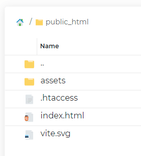
If necessary, please remember to change the Document Root of your domain to point to the new folder.
.htaccess Rules
In some cases, it may be necessary to add custom .htaccess rules to ensure all requests are served by the index.html file. You can find an example of one possible .htaccess file below:
RewriteEngine On
RewriteBase /
RewriteRule ^index\.html$ - [L]
RewriteCond %{REQUEST_FILENAME} !-f
RewriteCond %{REQUEST_FILENAME} !-d
RewriteRule . /index.html [L]












