Get 30% off your WordPress Hosting with code WPSAVE10. Launch Faster. Save More!
  • 00 Days
  • 00 Hours
  • 00 Minutes
  • 00 Seconds

Can I use sudo on shared hosting? - SIRSTEVEHQ CP

Sudo is a Linux command that allows a user to run commands as a 'super user', root. 

The use of the sudo command is not permitted on our shared hosting platform, and its use will result in an SSH access violation and your SSH access being suspended. 

This is noted in the welcome message when connecting to the shared services via an SSH connection...
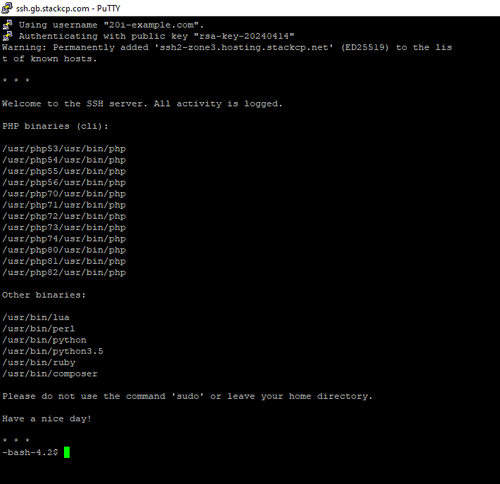
small_image_b3aab1099d.png

If the sudo command is used the terminal should close immediately, killing the current session. Attempting to reconnect should result in the terminal closing without warning.

Sudo is not permitted to ensure the security and integrity of our shared hosting platform. 

How do I unblock SSH access after using sudo?

If your hosting package's SSH access has been blocked due to the use of sudo, please raise a support ticket with our Support Team to remove this block. 

What if I need to use sudo?

If you require the use of the sudo command, you will need a Self-managed VPS rather than shared hosting.

  • 0 Users Found This Useful
Was this answer helpful?

Related Articles

How do I connect a website via SSH? - SIRSTEVEHQ CP

SSH, or ‘Secure Shell’, is a method of remotely accessing and managing your site files, as well...

How do I import a .sql file via the command-line? - SIRSTEVEHQ CP

If you've set up SSH access for a package then you can use one of two methods to import a MySQL...

How do I connect to SSH using 2FA? - SIRSTEVEHQ CP

It's only recommend that you connect to your package via SSH if you're familiar with the command...

How do I run Composer via SSH? - SIRSTEVEHQ CP

At SIRSTEVEHQ we run multiple different versions of PHP. On our SSH servers, the execution of...

Basic UNIX commands and utilities - SIRSTEVEHQ CP

When managing your SIRSTEVEHQ CP web hosting, you may wish to enable SSH access for one or more...










