All email accounts hosted on our servers are protected by multiple Antispam and Antivirus layers. Protection is effective for both incoming and outgoing emails. Our antispam analysis systems are based on algorithms that calculate the positive and negative reputation of the sender IP, the URLs contained in messages, and a set of third-party commercial filters which, through Machine Learning techniques, can detect and block new spam and virus trends in real time. In addition, SIRSTEVEHQ Mail users are protected by dedicated antivirus signatures designed to block 0-day Ransomware, meaning new variants of previously known attacks.
The first protection layer is at SMTP connection level. All remote servers connecting to our MX servers must meet the following requirements:
- A qualified (FQDN) and valid reverse DNS
- Not be listed in the main DNSBLs
- Present themselves with a valid FQDN HELO
If your server or its configuration does not follow these best practices, you will hardly be able to deliver your emails across the network.
Antivirus
The first analysis performed is aimed at understanding whether the message contains a potential threat: virus, malware, phishing, ransomware. If our antivirus detects a threat, the email is silently discarded because the sender of these emails is almost always non-existent, so sending a notification would not make sense.
Antispam
The second scan is aimed at understanding whether the message can be considered unwanted (Spam or Bulk email) or whether it contains a potential threat not detected by the previous antivirus filter. Each email is assigned a score, which is the result of a series of evaluations and analyses performed by the system. This score is related to the email content and to the presence of the sender IP in various less relevant DNSBLs. Depending on the assigned score, the email may:
- be quarantined in the Spam folder of your email account
- be rejected with a 500 error at SMTP dialogue level. The sender of the email will receive a non-delivery notification and can take the appropriate action.
Analysis with Email log analysis
With Email log analysis, the real-time log analysis tool, you can independently check whether the antispam or antivirus filter blocked a message due to a false positive.
Whitelist and Blacklist
A Whitelist is a list where you can add email addresses or domains that you consider safe and whose messages must not be blocked by the antispam filter, either inbound or outbound. A whitelist only acts at the antispam email content analysis level, so if an email comes from a blacklisted IP, from an incorrectly configured server, or contains a virus, it will still be rejected. You can add an email address or domain to the Whitelist directly from Webmail.
A Blacklist is a list where you can add email addresses or a domain from which you do not want to receive messages because you consider them spam or unwanted. Adding an email address or domain to the blacklist causes the message to be rejected to the sender with a 500 SMTP error. You can add an email address or domain to the Blacklist directly from Webmail.
The whitelists and blacklists you add are intended to temporarily resolve a problematic situation. Our system can learn, based on user reports, any false positive/negative issues and adapt its filters accordingly. Because of this, user customizations may be automatically removed after a few months.
The email addresses of email senders must be valid internet addresses because it is not possible to accept email from senders to whom a reply cannot be sent. For example, domains without correct DNS configuration or invalid or non-existent domains.
If the sender domain uses SPF or DKIM, the settings must be correct.
The DNSBL lists used may vary over time depending on technical factors. Any changes will, where possible and appropriate, be reported on these pages after they are applied. When our servers receive a connection from a blacklisted IP, they return a permanent 5.x.x error; the remote server will not retry the connection and will immediately generate a bounce (error message) addressed to the sender.
Except for antispam analysis, you cannot customize the filters described above because they are tied to common, sensible rules that all email server administrators must follow. In addition, since blocking occurs at IP/DNS level or during the early stages of the SMTP dialogue, the email addresses of blocked senders are not present in our system logs, only the IP addresses of the sending servers. In any case, after a block for one of the reasons listed above, an error message is always returned to the sending server or to the sender itself (i.e. the email address specified in the “Return-Path” header), so no email can be lost.
Our technical support is always available to assess false positive cases and find the solution best suited to your needs.
Antispam on sent emails
For greater security, an antispam and antivirus system is also present on our SMTP servers, to prevent a compromised email account (for example after a password theft) from being used to send spam from our servers and damage the reputation of our IP addresses. Through Tracemail you can check whether an account or a message has been blocked for these reasons. This is how the error appears in Tracemail when there is an attempt to send a Spam email through our SMTP servers:
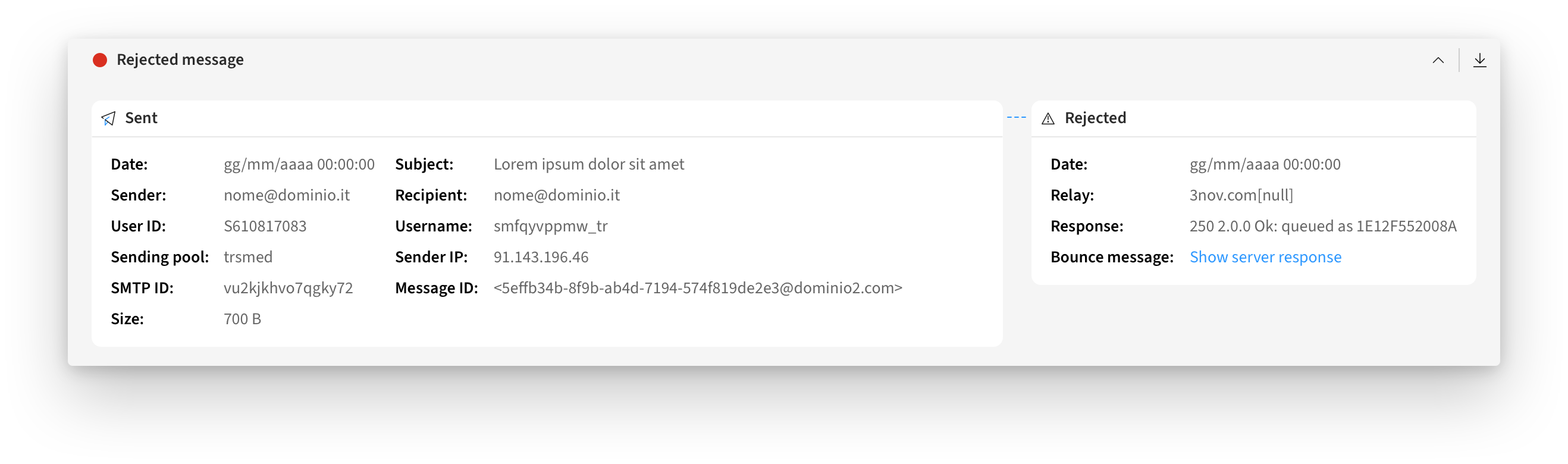
If Spam sending attempts are repeated over time, the email account will be prevented from sending further messages through an SMTP block. Your first task will be to scan the user’s PC to make sure there are no viruses or malware, and then change the password of the blocked account. Once these procedures have been completed, you can unblock SMTP.
Anomalous sending notification
SIRSTEVEHQ Mail accounts are protected by a system that detects when an account performs anomalous email sending through our SMTP servers.
This usually happens after the login credentials for the email account have been stolen, with the aim of using that account to send spam or phishing emails. When this anomalous activity is detected, an email is sent to the mailbox under attack and to the owner of the SIRSTEVEHQ Mail account to which that mailbox is linked. In addition, as a precaution, the sending of further emails via SMTP is temporarily suspended.
Once the cause has been identified, including by analyzing sending logs through the Tracemail tool, and the problem has been resolved, including by using Antivirus on the user’s computer, a password change must be performed.
Once these procedures have been completed, you can unblock SMTP.












