In this guide, we will learn how to hide or suppress PHP errors and notices such as the common PHP deprecated warnings.
Disable PHP error reporting
- Open Websites in the left sidebar
- Select the website where you would like to change the document root
- Select Advanced from the top menu and select the domain
- Select Developer Tools
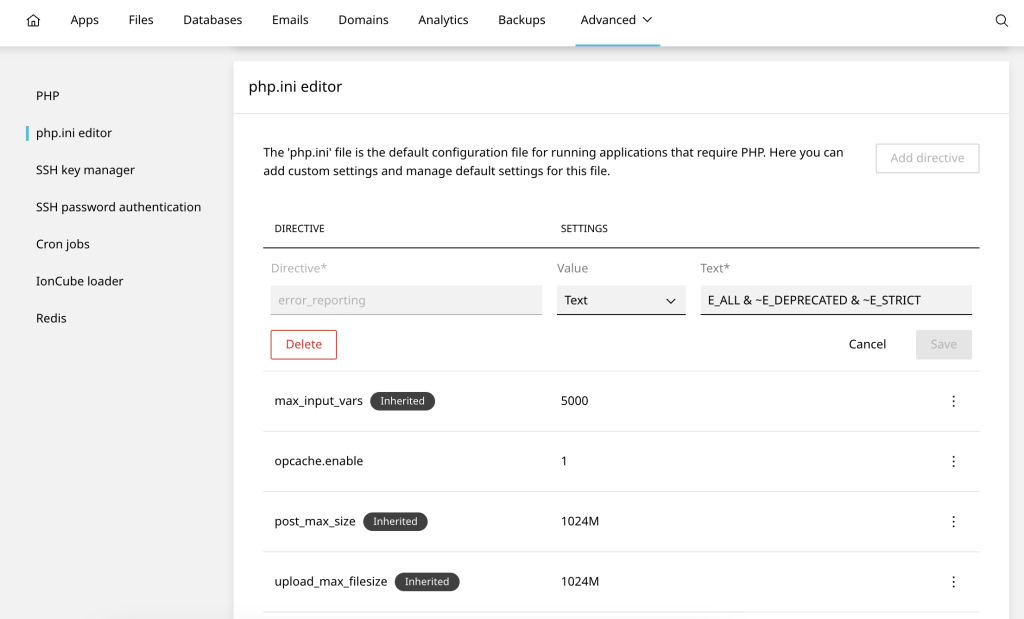
- Scroll to php.ini editor and click Add directive
- Enter the required error_reporting directive
The PHP runtime configurations within your own code can override the above settings specified in php.ini. To identify where this occurs, search your PHP scripts for occurrences of ini_set or error_reporting.
Alternatively, consider downgrading your PHP version to one that does not deprecate the functions your code relies on. This could resolve the issue without needing to alter script configurations.
Error reporting usage
Here’s a list of directives you can modify:
error_reporting
This directive controls which errors and warnings should be reported. To disable error reporting entirely, you can set it to 0. However, it’s generally not recommended to disable error reporting completely in a production environment. For development purposes, you might want to set it to E_ALL & ~E_NOTICE to report all errors except notices.
error_reporting = 0display_errors
This directive determines whether errors should be displayed to the user (in the browser) or not. Setting it to Off will prevent errors from being displayed.
display_errors = Offlog_errors
If you want to log errors to a file rather than displaying them, you can set this directive to On. This can be useful for debugging purposes without exposing errors to users.
log_errors = Onerror_log
This directive specifies the file where PHP errors should be logged when log_errors is enabled. You can specify a file path here.
error_log = /path/to/error.logError reporting bitmasks
E_ALL
Report all PHP errors and warnings.
error_reporting = E_ALLE_ERROR
Report only fatal errors that halt script execution.
error_reporting = E_ERRORE_WARNING
Report runtime warnings (non-fatal errors).
error_reporting = E_WARNINGE_NOTICE
Report runtime notices.
error_reporting = E_NOTICEE_PARSE
Report parse errors (syntax errors).
error_reporting = E_PARSEE_DEPRECATED
Report usage of deprecated PHP features.
error_reporting = E_DEPRECATEDE_STRICT
Report recommendations to improve code compatibility.
error_reporting = E_STRICTCombining bitmasks
You can combine these error levels using the bitwise AND (&) and the bitwise OR (|) operators, as well as the placement of the negation (~) operators.
For example, to report all errors except notices and strict standards:
error_reporting = E_ALL & ~E_NOTICE & ~E_STRICT












