1. Log in to your cPanel account.
2. In the Databases section, click on MySQL Databases.

3. In the New Database field, enter a name for the new database you wish to create.
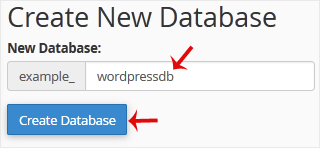
4. Click on Create Database.

Fast, reliable hosting for every need — from simple shared hosting and WordPress to cloud servers, reseller hosting and complete website solutions, we have the right platform for you.
1. Log in to your cPanel account.
2. In the Databases section, click on MySQL Databases.
3. In the New Database field, enter a name for the new database you wish to create.
4. Click on Create Database.
1. Log in to your cPanel account. 2. In the Databases section, click on MySQL Databases. 3....
1. Log in to your cPanel account. 2. In the Databases section, click on MySQL Databases. 3....
1. Log in to your cPanel account. 2. In the Databases section, click on MySQL Databases. 3....
1. Log in to your cPanel account. 2. In the Databases section, click on MySQL Databases. 3....
1. Log in to your cPanel account. 2. In the Databases section, click on phpMyAdmin. 3. From...












