Get 30% off your WordPress Hosting with code WPSAVE10. Launch Faster. Save More!
  • 00 Days
  • 00 Hours
  • 00 Minutes
  • 00 Seconds

How to Create a Subdomain in SiteWorx

A subdomain is an additional part of your primary domain. For example, blog.example.com is a subdomain. Please, follow this tutorial to create a subdomain in SiteWorx.

1. Log in to your SiteWorx account.

2. In the Domains section, click on Subdomain.

sw-subdomain-icon.gif

3. Click on the Plus icon.

4. Enter your subdomain name, and choose the appropriate domain from the drop-down menu if there are multiple domains. Then click on Add.
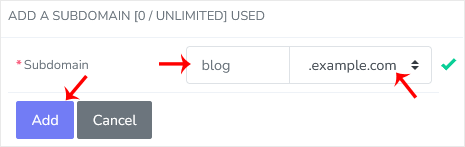
subdomain-add.gif

You should see a success message that the subdomain has been created.

  • 0 Users Found This Useful
Was this answer helpful?

Related Articles

How to Remove a Subdomain in SiteWorx

A subdomain is an additional part of your primary domain. Please, follow this tutorial to remove...

How to Add a Secondary Domain in SiteWorx

Secondary Domains are full-fledged domains with their own vhosts. 1. Log in to your SiteWorx...

How to Remove Secondary Domain in SiteWorx

Removing a secondary domain is easy. You should back up your account before doing this. 1. Log...










