Get 30% off your WordPress Hosting with code WPSAVE10. Launch Faster. Save More!
  • 00 Days
  • 00 Hours
  • 00 Minutes
  • 00 Seconds

How to Create a Directory or Files in the SiteWorx File Manager

SiteWorx File Manager is handy for managing your website files.

1. Log in to your SiteWorx account.

2. In the File Manager section, click on File Manager.

sw-file-manager-icon.gif

3. If you have multiple domains, then choose the appropriate domain from the drop-down menu and click on Login.

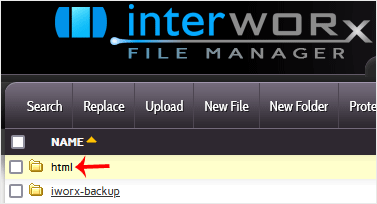
4. Navigate to the directory where you want to create your file. For creating a file in the HTML directory, click on the HTML directory.
siteworx-filemanager-html.gif

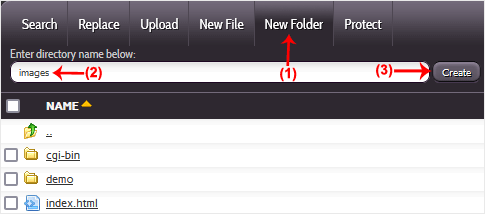
5. Click on New Folder.

6. Enter your directory name, such as images. Then click on Create.
siteworx-filemanager-folder.gif

How to create a new file such as myfile.txt?

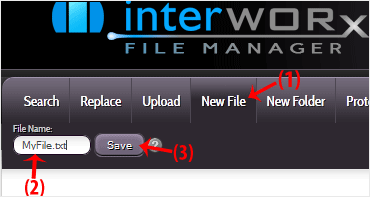
1. Click on the New File menu.

2. Enter your filename in the File Name field. Then click on Save.
siteworx-filemanager-file.gif

  • 0 Users Found This Useful
Was this answer helpful?

Related Articles

How to Reset My SiteWorx's Account Password

After you access your SiteWorx account, follow these steps to reset your password: 1. Log in to...

How to Upload Files via the SiteWorx File Manager

You can use SiteWorx's inbuilt file manager instead of an FTP program. 1. Log in to your...

How to Edit File in the SiteWorx File Manager

You can use SiteWorx's inbuilt file manager to edit files on your website. 1. Log in to your...

How to Access AWStats in SiteWorx

AWStats is an open-source web analytics tool. Follow the steps below to access your AWStats. 1....

How to Access Webalizer in SiteWorx

Webalizer is an open-source web analytics tool. Follow the steps below to access Webalizer. 1....










