Get 30% off your WordPress Hosting with code WPSAVE10. Launch Faster. Save More!
  • 00 Days
  • 00 Hours
  • 00 Minutes
  • 00 Seconds

How to manage FTP accounts – Enhance Hosting

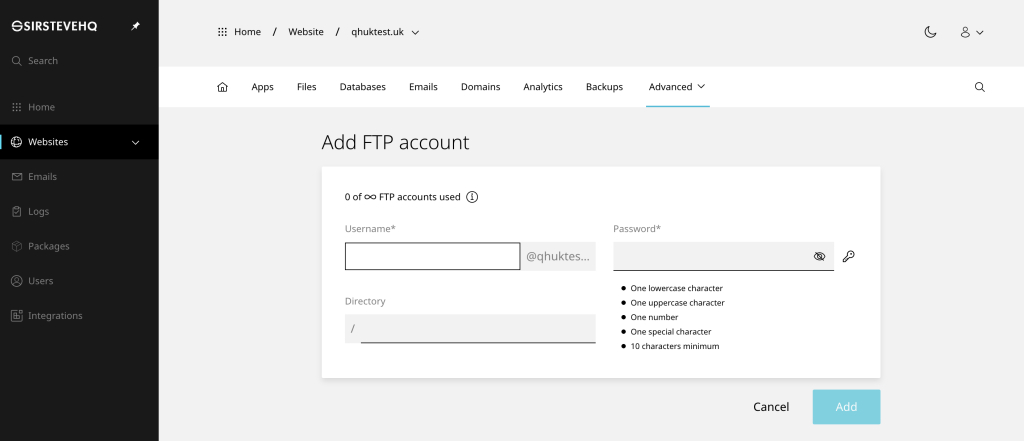
To add an FTP accounts on a single website:

  • On the website dashboard select the advanced drop-down menu
  • Click FTP and Add account
  • Enter the desired Username and Password
  • In the Directory box specify the the path (leave blank if unsure)
  • Click Add to finish

en-ftp-add-1024x441.jpg

In your FTP software you would then enter:

If you are unable to connect to FTP, please ensure any firewall (local or external) allows the FTP passive port range 30000:31000

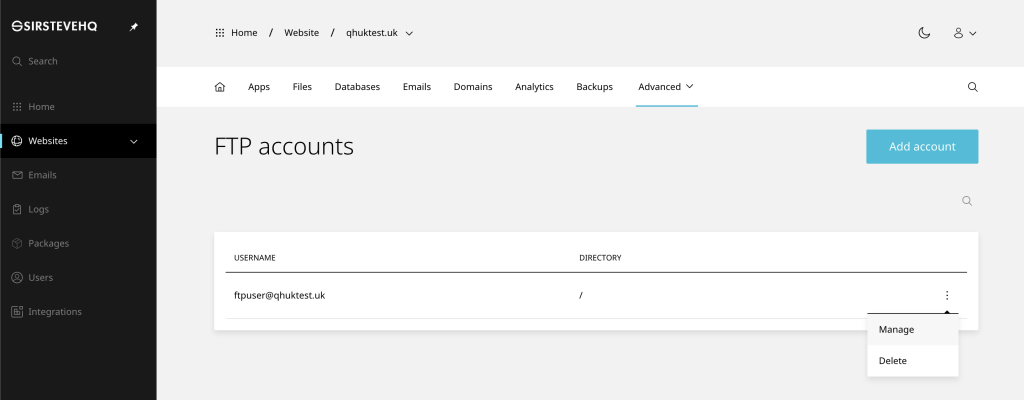
To manage FTP accounts on a single website:

  • On the website dashboard select the advanced drop-down menu
  • Click FTP then (3 dots) and Manage or Delete
  • You can now edit the Password and Directory
  • In the Directory box specify the the path (leave blank if unsure)

en-ftp-manage-1024x400.jpg

  • 0 Users Found This Useful
Was this answer helpful?

Related Articles

How to disable PHP error reporting – Enhance Hosting

In this guide, we will learn how to hide or suppress PHP errors and notices such as the common...

How to manage DNS – Enhance Hosting

How to add or edit DNS To add or edit DNS entries: Open Websites in the left sidebar Select...

Add a Staging Site & Push Live – Enhance Hosting

To add a staging website Open Websites in the left sidebar Click Add new Select either Start...

Importing a cPanel backup – Enhance Hosting

The cPanel importer allows you to migrate a cPanel account into your website. To import a...

How to enable Redis – Enhance Hosting

Redis can be enabled on a per-website basis. This setting is disabled by default. Once enabled...