Get 30% off your WordPress Hosting with code WPSAVE10. Launch Faster. Save More!
  • 00 Days
  • 00 Hours
  • 00 Minutes
  • 00 Seconds

Two Factor Authentication (2FA) – Enhance Hosting

Two-factor authentication helps to protect a users account by adding an additional layer of security. Once Two-factor Authentication is enabled, a password and time sensitive code is required in order to access an account.

Two-factor authentication is enabled on a per account basis.

To enable Two-factor Authentication:

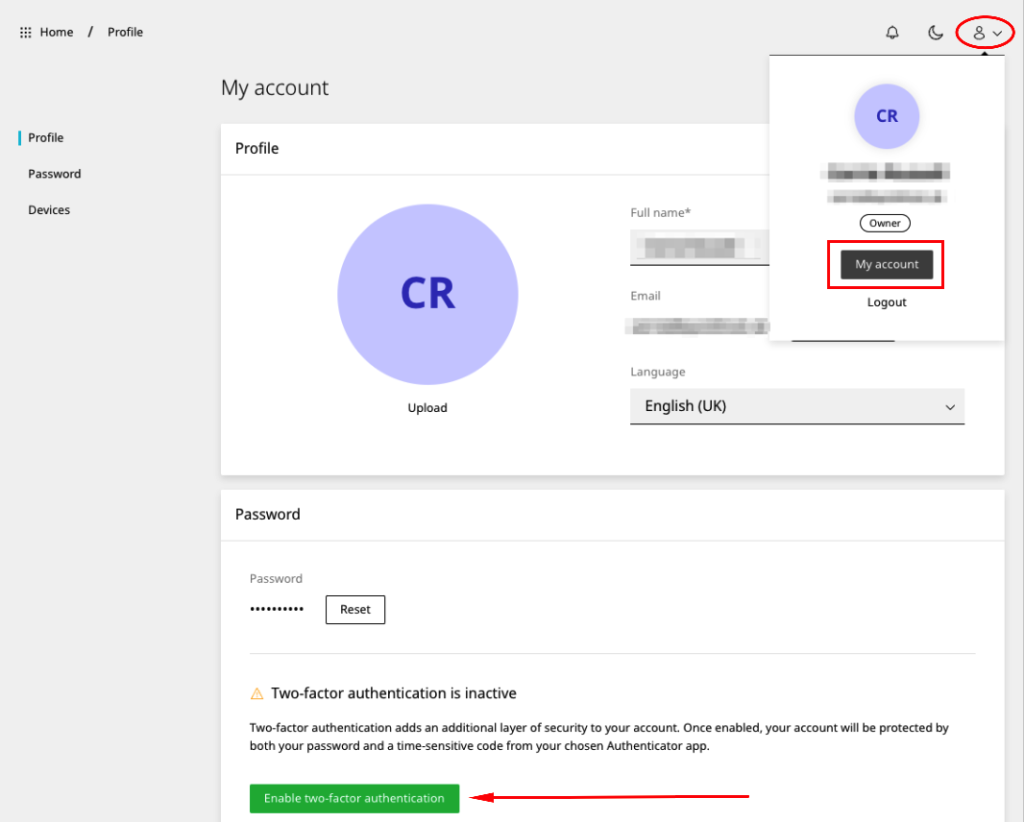
  • Click the avatar in the top right corner of the dashboard and select My account
  • Scroll to Two-factor authentication and click Enable two-factor authentication
  • Open your two-factor authentication app (Google Authenticator or similar) and select to add an account. Scan the QR code shown on the screen
en-2fa-1024x822.png

Enabling Two-factor authentication will automatically log you out of the Enhance panel and you will be required to login using your password and the time-sensitive code!

  • 0 Users Found This Useful
Was this answer helpful?

Related Articles

How to disable PHP error reporting – Enhance Hosting

In this guide, we will learn how to hide or suppress PHP errors and notices such as the common...

How to manage DNS – Enhance Hosting

How to add or edit DNS To add or edit DNS entries: Open Websites in the left sidebar Select...

Add a Staging Site & Push Live – Enhance Hosting

To add a staging website Open Websites in the left sidebar Click Add new Select either Start...

Importing a cPanel backup – Enhance Hosting

The cPanel importer allows you to migrate a cPanel account into your website. To import a...

How to manage FTP accounts – Enhance Hosting

To add an FTP accounts on a single website: On the website dashboard select the advanced...










