Get 30% off your WordPress Hosting with code WPSAVE10. Launch Faster. Save More!
  • 00 Days
  • 00 Hours
  • 00 Minutes
  • 00 Seconds

Configure Nginx for WordPress Permalinks – Enhance Hosting

URL Rewriting

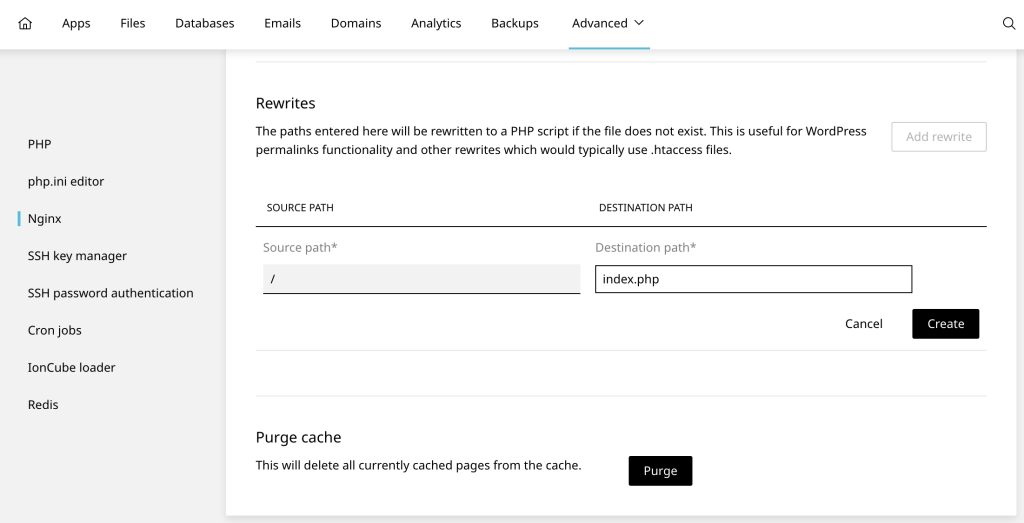
This will rewrite paths to a PHP script if the file does not exist. This is useful for WordPress permalinks functionality and other rewrites which would typically use .htaccess files.

To configure URL rewriting:

  • Select Websites from the left-hand menu
  • Select the website you would like to edit the Nginx settings for
  • Visit Developer tools and scroll to the Nginx card
  • Select the domain you would like to edit and configure the Rewrites settings
301_worpress-nginx-rewrite-1024x523.png

Main Domain
Source path: /
Destination path: index.php

Within Directory
Source path: /path/to/wordpress/directory
Destination path: index.php

  • 0 Users Found This Useful
Was this answer helpful?

Related Articles

How to clear LiteSpeed Cache in WordPress

If you’re using LiteSpeed Cache on your WordPress website, it’s important to clear the cache when...

How to force a LiteSpeed web server licence update – LiteSpeed Enterprise

If your LiteSpeed Web Server (LSWS) is failing to start due to a license error (e.g. after...

Nginx Website Tools – Enhance Hosting

Websites hosted on a Nginx web server have additional tools available to them in the control...

Best Apache Worker (MPM) for WordPress and PHP CMS hosting on cPanel – Apache

When hosting WordPress or any PHP-based CMS (such as Joomla, Drupal, or Magento) on a cPanel...










