Get 30% off your WordPress Hosting with code WPSAVE10. Launch Faster. Save More!
  • 00 Days
  • 00 Hours
  • 00 Minutes
  • 00 Seconds

WordPress toolkit overview – Enhance Hosting

Our Enhance Hosting has a native WordPress manager buit-in.

The WordPress toolkit provides a feature-rich management interface that allows users to update and manage WordPress installations without having to leave the hosting control panel.

WordPress toolkit features

  • Pre-install application
  • Plugin manager
  • Theme manager
  • WordPress admin lockdown
  • WordPress user manager
  • WordPress SSO
  • Core WordPress auto-updates
  • Debugging tools (WP_DEBUG, WP_DEBUG_LOG and WP_DISPLAY)
  • Maintenance mode

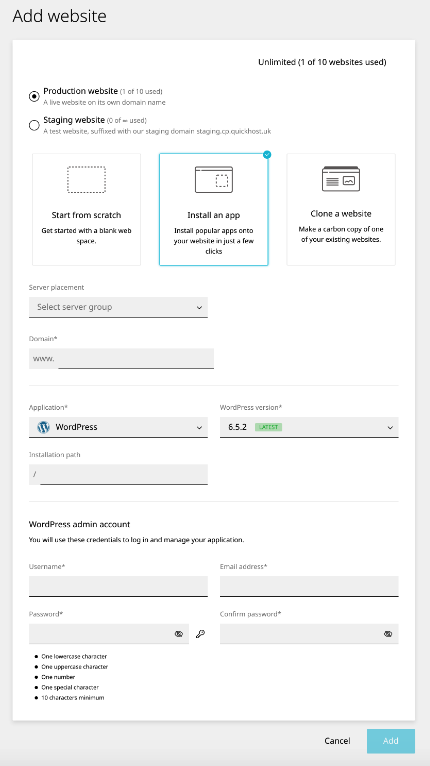
Install a new WordPress on a new website

  1. Open Websites in the left sidebar
  2. Click Add new
  3. Select Install an app 
  4. Click Add to finish

wptk1.png

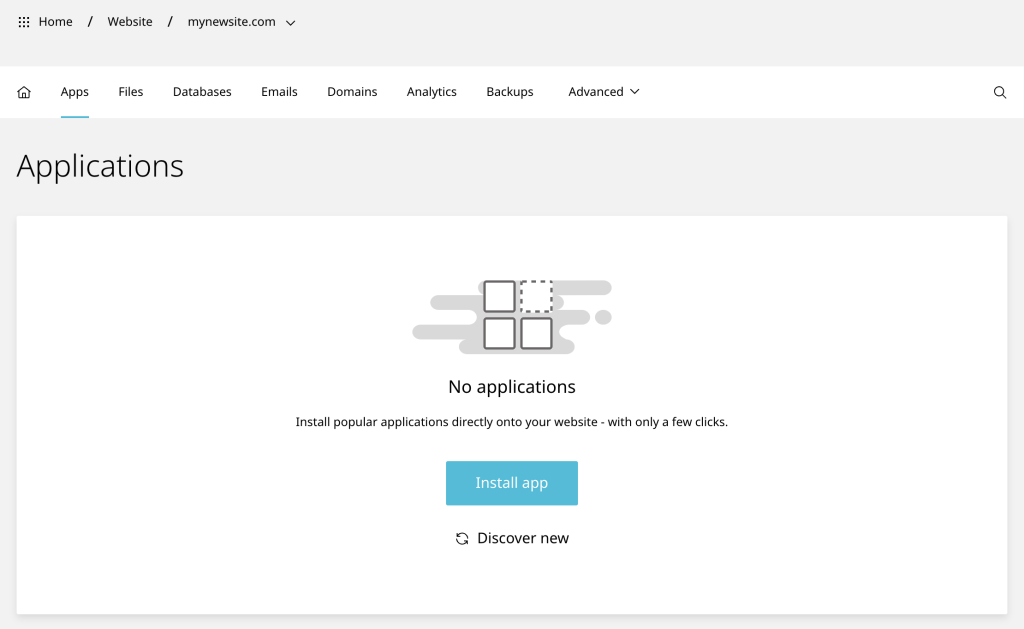
Import an existing WordPress site

  1. Open Websites in the left sidebar
  2. Select the desired Website
  3. Select Apps in the top navigation bar
  4. Click Discover new to finish

wptk2-1024x629.png

  • 0 Users Found This Useful
Was this answer helpful?

Related Articles

Updating failed. The response is not a valid JSON response – Enhance Hosting

If you cannot save or edit posts or pages and see an error message like “Updating failed. The...

How to Install WordPress Themes

Installing a new WordPress theme allows you to change the appearance and functionality of your...

WordPress – Error establishing a database connection – Enhance Hosting

Are you encountering the ‘Error establishing a database connection’ message on your WordPress...

Optimise WordPress – Enhance Hosting

Optimising a WordPress site involves several strategies that enhance performance, improve loading...

WordPress Site 404 – Enhance Hosting

If immediately after installing WordPress on a site you receive a 404 when using SSO, please...