Get 30% off your WordPress Hosting with code WPSAVE10. Launch Faster. Save More!
  • 00 Days
  • 00 Hours
  • 00 Minutes
  • 00 Seconds

How do I check MySQL Database sizes across packages in SIRSTEVEHQ CP?

SIRSTEVEHQ provides an easy way to monitor and view all MySQL database sizes across all packages in your SIRSTEVEHQ CP account.

To access the MySQL Database Size Reports:

  1. Login to SIRSTEVEHQ CP.
  2. Head to home page and select MySQL Databases.
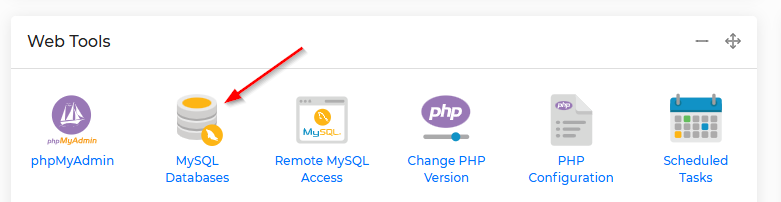
MySQL Database Usage Report

You’ll see a full list of all the databases under your SIRSTEVEHQ CP account and their sizes. You’re also shown which domain they are associated-with so that you can manage the MySQL database, should you need-to.

2025-09-27%2010_01_35-My20i%20-%20MySQL%20Databases.png

  • 0 Users Found This Useful
Was this answer helpful?

Related Articles

How do I create a MySQL database in SIRSTEVEHQ CP?

You can create MySQL databases in seconds directly from your SIRSTEVEHQ CP. This option is...

How do I manage my Microsoft SQL database? - SIRSTEVEHQ CP

We recommend using SQL Server Management Studio (SSMS) for managing your Microsoft SQL databases....

How do I download or back up my MySQL Database? - SIRSTEVEHQ CP

There are various ways to export your MySQL databases for safe keeping or transfer. The first...

Can I set my database hostname as 'localhost'? - SIRSTEVEHQ CP

The answer to this question depends on the platform type that you are using at SIRSTEVEHQ!...

How do I import a .sql file via phpMyAdmin? - SIRSTEVEHQ CP

You can use phpMyAdmin to import an .SQL file with your database information. To do this: Log...










