Get 30% off your WordPress Hosting with code WPSAVE10. Launch Faster. Save More!
  • 00 Days
  • 00 Hours
  • 00 Minutes
  • 00 Seconds

How to configure DNS settings for G Suite and Gmail - SIRSTEVEHQ CP

Our control panel allows automatic configuration of DNS Records. You can configure your domain name for G Suite (Google Apps) in SIRSTEVEHQ CP.

  • First, login to SIRSTEVEHQ CP, and select Manage on the hosting package you wish to add G Suite DNS records-to.
  • Select the Manage DNS icon

manage_DNS.png

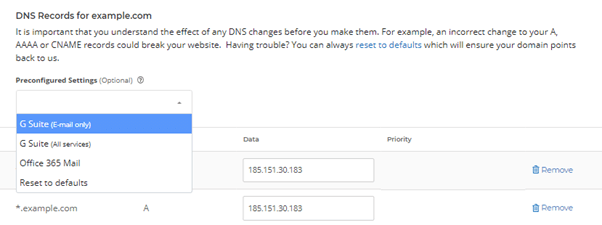
  • In the dropdown beneath Preconfigured Settings, you'll see two available options: G Suite (E-mail only) and G Suite (All services). The configuration you should use depends on the services you want from Google. If you're using Google just for mail under your own domain name (MX records) use the G Suite (E-mail only) link. For all the other G Suite applications, including records for Docs, Chat, Calendar, and services like Hangouts, use the G Suite (All services) option.
DNS_for_Google.png

The control panel will show you the records that will be automatically added as a result of this change, allowing you to save them.

Please bear in mind that DNS changes can take up to 24 hours to fully propagate worldwide. 

  • 0 Users Found This Useful
Was this answer helpful?

Related Articles

How to transfer your domain from Namesilo to SIRSTEVEHQ

Here’s how to transfer your domain name to us from Namesilo, so you can start saving on renewal...

Domain transfer statuses explained?

After submitting a domain name for transfer, you can keep track of its status from your Client...

How to transfer your domain from Google Domains to SIRSTEVEHQ

Here’s how to transfer your domain name to us and start saving on renewal prices. Domains that...

How do I add a DKIM record? - SIRSTEVEHQ CP

DKIM, like SPF, is a standard that enables a specific aspect of the email sending process to be...

How do I change the registrant name for a .uk domain name?

Registrant name changes for a .uk domain name (.co.uk/.me.uk/org.uk/.uk) can only be performed...