Ordering Your .NET Core Optimized Server
Navigate to the order page:
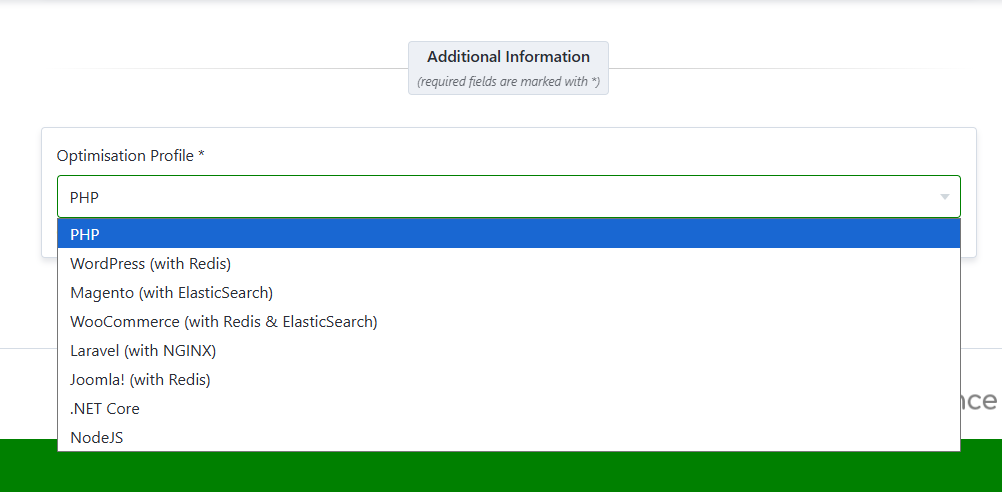
Select .NET Core Optimization: Under the Optimisation Profile section, click on the .NET Core option to ensure your server is configured for .NET Core applications.
- Choose Your Platform: Select where you want your server to be hosted: SIRSTEVEHQCloud, AWS, or Google Cloud Platform.
- Specify Your Server: Decide on your server specifications according to your needs, ranging from Micro to 8X Large.
- Select Server Location: Choose a server location that best suits your target audience or requirements, such as London, England for European-based services or Dallas, US.
- Purchase Your Server: Click on 'Continue' to purchase your order.
When you purchase a .NET Core optimized Cloud Server through SIRSTEVEHQCloud, AWS, or Google Cloud, setting up your .NET application is streamlined with our installer wizard. Below are the steps and options available during the installation process:
Accessing the .NET Core Installer
Follow the steps below once your Cloud Server has provisioned.
- Head to SIRSTEVEHQ CP.
- Create a new hosting package on the newly created cloud server.
- When your new package has been created head to Manage Hosting and select (Options) > Manage
- The .NET Core installer will then show.
Installation Options
The installer provides three distinct setup choices for your .NET Core application:
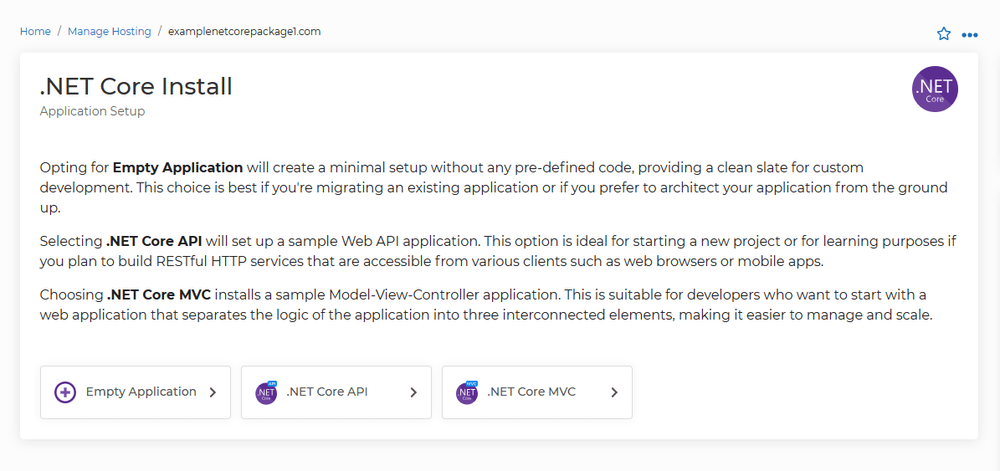
1. Empty Application
- Use Case: Best for those who are migrating an existing application or who prefer to build their application from scratch.
- What It Does: Creates a minimal setup without any pre-defined code, allowing you to architect your application with complete freedom.
2. .NET Core API
- Use Case: Ideal for starting a new project or for learning purposes, especially if you aim to build RESTful HTTP services.
- What It Does: Sets up a sample Web API application template, which is accessible from various clients such as web browsers or mobile apps.
3. .NET Core MVC
- Use Case: Suitable for developers who want to begin with a web application that employs the Model-View-Controller architecture.
- What It Does: Installs a sample MVC application, which helps in organizing the logic of the application into three interconnected elements: Model, View, and Controller. This separation enhances manageability and scalability.












