Get 30% off your WordPress Hosting with code WPSAVE10. Launch Faster. Save More!
  • 00 Days
  • 00 Hours
  • 00 Minutes
  • 00 Seconds

How to migrate Gmail accounts to SIRSTEVEHQ CP

Our in-house email migration tool can be used to automatically migrate mailbox data from Gmail email accounts across to Stackmail quickly and easily. 

  • Go to your Google Account.  
  • Select Security and ensure that 2FA is enabled 
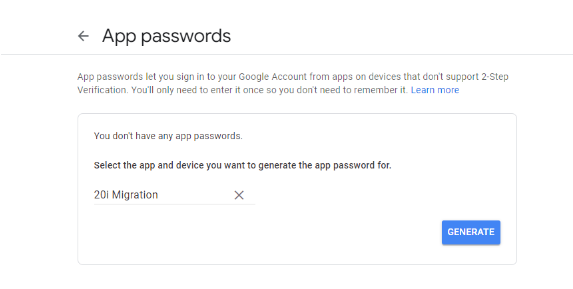
  • Under Signing in to Google, select App Passwords. 
  • Under the Select App option, choose Mail. 
  • Under the Select Device option, choose Other and name the device with any unique identifier – for example, 'Migration'.
Gmail_Migration.png

  • Click Generate and take note of the password. 
  • On the hosting package, go to the Email Migrations page   
  • Select Gmail as the mailbox type and enter your Gmail username/email address followed by the App Password that you created in the previous steps.   
  • Choose your destination mailbox and select Sync to start the migration. 
  • 0 Users Found This Useful
Was this answer helpful?

Related Articles

Can I import contacts to webmail? - SIRSTEVEHQ CP

Yes, you can import a contact list from a previous mail client into SIRSTEVEHQ CP webmail. To do...

Which platform will my website be migrated to? - SIRSTEVEHQ CP

All SIRSTEVEHQ CP customers on our WordPress, or Cloud Hosting have access to our Migration...

How do I migrate from cPanel and WHM? - SIRSTEVEHQ CP

Migrating from a cPanel / WHM host to SIRSTEVEHQ CP's scalable platform is quick and easy by...

Can SIRSTEVEHQ CP Support migrate my emails if I use WordPress FTP migration?

To migrate your emails and mailboxes to SIRSTEVEHQ CP email hosting, you can use our in-house...

What can the Migration Centre move? - SIRSTEVEHQ CP

The Migration Centre helps ease migrations from other providers. Currently, we support 6 types of...










