When you order a Cloud hosting or WordPress hosting, you're automatically given a temporary URL. Temporary URLs are useful for:
- Viewing a hosting package when you have used a domain reference
- Viewing a site that you’ve migrated, before you switch the DNS to SIRSTEVEHQ CP
- Showing your client their site before making it live on the actual domain name
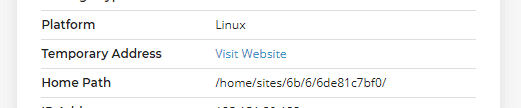
You can view a package's temporary URL in SIRSTEVEHQ CP:
Viewing a hosting package when you have used a domain reference
At SIRSTEVEHQ CP you can create a hosting package using a domain reference. This means that the hosting package won’t be connecting to a live domain name via DNS, so to view the files you’ve uploaded to the site you can use the temporary URL.
It will display the site as if it were live, except it will be on our temporary URL servers and the URL is something like http://example-com-ng.sirstevehqcp.com.
Viewing a site that you’ve migrated, before you switch the DNS to SIRSTEVEHQ CP
When migrating a site to SIRSTEVEHQ CP, we recommend the following process:
- Migrate the site files, emails and databases to SIRSTEVEHQ CP
- Check the site works at SIRSTEVEHQ CP via the temporary URL
- Point the nameservers to SIRSTEVEHQ CP.
Step 2 is where the temporary URL comes in.
After you’ve copied all the site data in SIRSTEVEHQ CP, you may want to check that it works. Selecting the temporary URL will show you what the site will look like before you’ve pointed the nameservers to SIRSTEVEHQ CP’s.
Showing your client their site before making it live on the actual domain name
You may want to show your client a site that you’ve developed for them, without it being accessible on the live domain name. You can give your clients the URL: http://example-com-ng.sirstevehqcp.com/
Alternatively, you create a redirect from the domain name to the temporary URL. Read our guide on How to switch between temporary and live URL.
Frequently Asked Questions
Is the temporary URL the same as a Staging Environment?
No, the temporary URL is not the same as a staging environment as it will always reflect what will be on the live site, so it’s not possible to perform work and then “push” changes to the live domain name.
Does the temporary URL support SSL?
Temporary URLs fully support HTTPS:// connections by default – there’s no need to install an SSL on the site in order to connect to your temporary domain using https://. If you wish to use a customised temporary URL, the base domain will have to have an SSL installed on it for the connection to load securely, however.
Are there any alternatives to using the temporary URL?
Yes, you can modify your hosts files. Your machine's local hosts file allows you to override DNS for a particular domain or subdomain name. This is a great way to test the site ahead of changing real DNS: you're able to test the website at SIRSTEVEHQ CP while the rest of the internet continues to use DNS to point to the existing website.
Does my website perform the same on the temporary URL servers?
No, temporary URL servers are reduced capacity as they're just for trialing a website on the platform before going live so they're not intended to benchmark performance.
Can I disable the temporary URL?
Whilst it's not possible to remove the temporary URL completely, if you set your website's home & site URL to the live domain name the temporary URL should redirect all traffic to the live site from the temporary URL.












