Using the SIRSTEVEHQ CP WordPress Tools
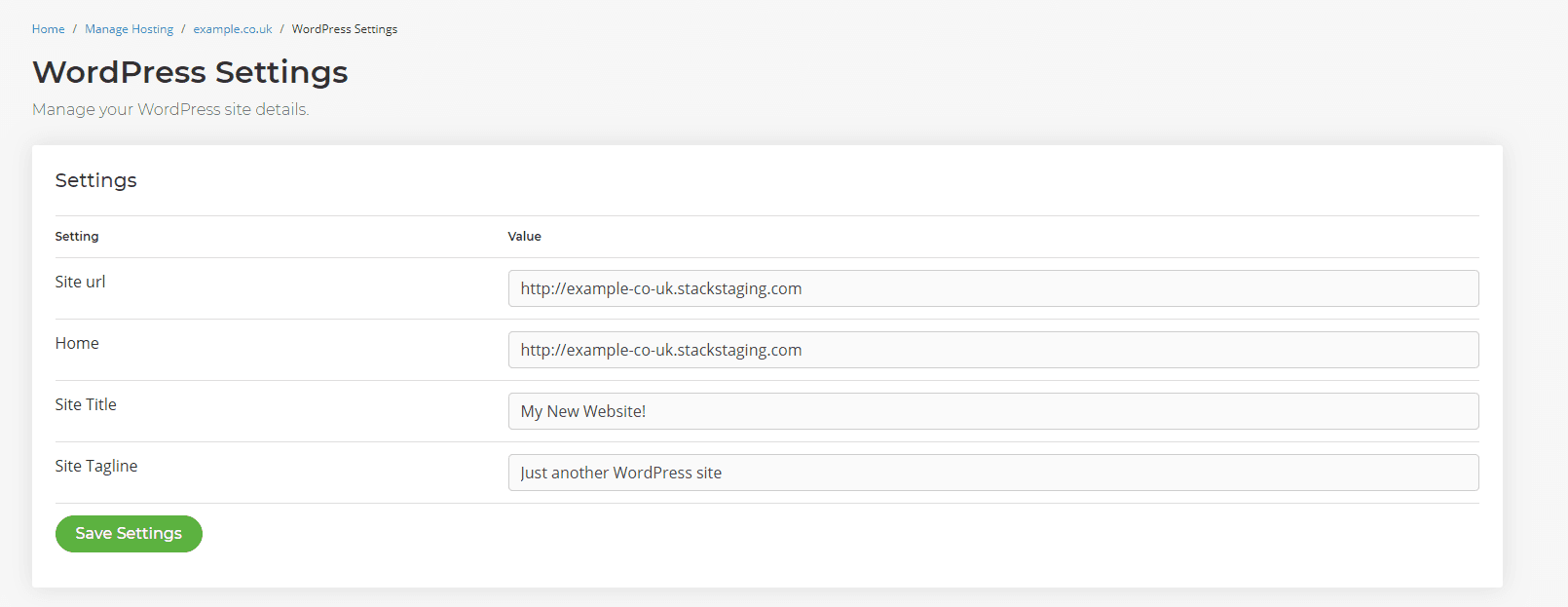
If you've utilised SIRSTEVEHQ CP's temporary URL and would like to update it to your own live domain, then you can easily use the SIRSTEVEHQ WordPress tools to update this. To update the temporary to the live URL:
- Head to SIRSTEVEHQ CP -> Settings.
- You'll then see the Site URL and Home fields, currently, they should have URL that looks something like http://example-co-uk.stackstaging.com.
- Simply update both of these fields to your live domain, e.g. http://example.co.uk.
- Select Save Settings.
Note: Ensure you update the hyphens (e.g. ' - ') to periods (e.g. ' . ') when updating the URL in order for the live domain to work correctly.
You should now be able to access your site at your live domain.
Try SIRSTEVEHQ's WordPress Hosting today. You'll get WordPress staging, a global CDN and unlimited email as well as exclusive WordPress page speed plugins for your website with bullet-proof security.












