Having a custom error page can have many advantages.
If you wish to customise or brand the default error pages that are shown on your sites it is quick and easy when you web hosting is with us.
Head to SIRSTEVEHQ CP.
Under ‘Web Tools’ Select the Custom Errors icon.
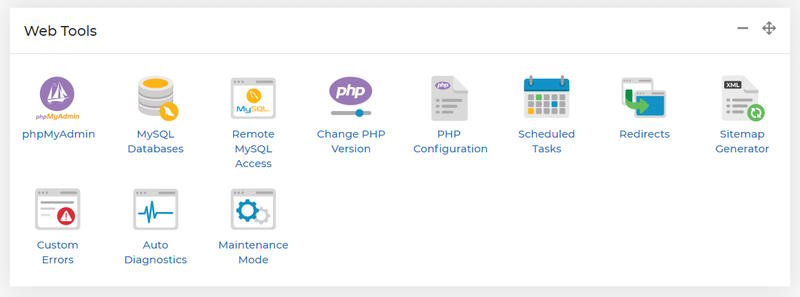
From here you can configure what action occurs when a particular status code is encountered on the site.
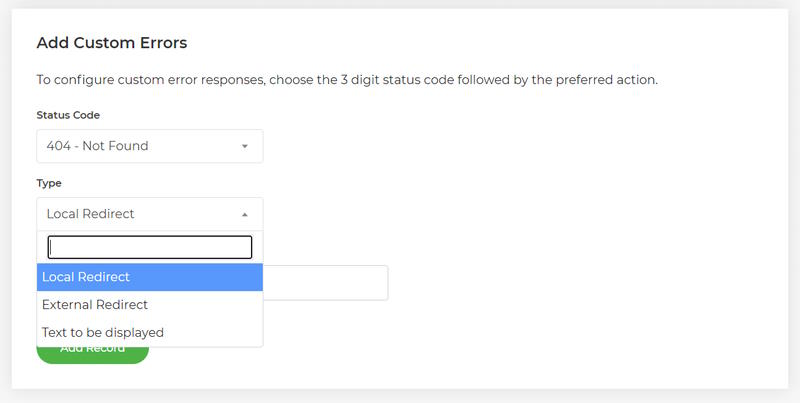
How to set a custom error page
It is really simple to set a custom error page. Select the status (error) code you wish to configure action for, then select the type of action that you want to happen and the final value of the action which will either be a redirect to a page you created for this purpose, external URL or plain text.
For WordPress hosted websites, that means no extra plugin is needed to show a custom error page.
Why set a custom error page?
There are multiple reasons why having a custom error page is beneficial for your website.
- Improved user experience: Customised error pages can provide a better user experience by providing your website visitors with helpful and informative messages instead of generic and unhelpful error messages. A custom error page can include instructions on how to resolve the issue, direct to other helpful pages on the website or provide your contact information.
- Branding and personalization: Individualised error pages can be designed to match the website's branding and style, providing a consistent look and feel. This can help reinforce the website's brand and create a personalized experience for users.
- Reduced bounce rates: A well-designed error page can encourage users to stay on the website and continue browsing, rather than leaving the website due to a frustrating error message. This can help reduce bounce rates and increase user engagement.
- Error tracking and analysis: Custom error pages can be used to track and analyse errors on the website. This can help website owners identify and resolve recurring errors, improving the overall reliability and performance of the website.
What error code can a custom page be set up for:
You can quick an easy set a custom error page for all 4xx and 5xx error codes.
In detail the error codes are:
|
4xx Client Error |
5xx Server Error |
|
400 Bad Request |
500 Internal Server Error |
|
401 Unauthorized |
501 Not Implemented |
|
402 Payment Required |
502 Bad Gateway |
|
403 Forbidden |
503 Service Unavailable |
|
404 Not Found |
504 Gateway Timeout |
|
405 Method Not Allowed |
505 HTTP Version Not Supported |
|
406 Not Acceptable |
506 Variant Also Negotiates |
|
407 Proxy Authentication Required |
507 Insufficient Storage |
|
408 Request Timeout |
508 Loop Detected |
|
409 Conflict |
510 Not Extended |
|
410 Gone |
511 Network Authentication Required |
|
411 Length Required |
|
|
412 Precondition Failed |
|
|
413 Payload Too Large |
|
|
414 URI Too Long |
|
|
415 Unsupported Media Type |
|
|
416 Range Not Satisfiable |
|
|
417 Expectation Failed |
|
|
418 I'm a teapot |
|
|
421 Misdirected Request |
|
|
422 Unprocessable Entity |
|
|
423 Locked |
|
|
424 Failed Dependency |
|
|
425 Too Early |
|
|
426 Upgrade Required |
|
|
428 Precondition Required |
|
|
431 Request Header Fields Too Large |
|
|
451 Unavailable For Legal Reasons |












