You can restore lost mailbox data using the Timeline Backups addon – which can be ordered through your SIRSTEVEHQ account as an addon. With Timeline Backups Pro you will receive 30 days of snapshots of all the email accounts on your account.
- Firstly, you’ll need to head to the Timeline Backups tool in SIRSTEVEHQ CP. It willl be under Manage Hosting > Web Files
- Now find the hosting package that the email account is assigned-to from the list. Once you've found the relevant package, you will then need to select Manage.
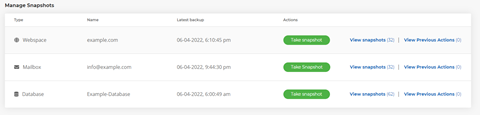
- You'll see a list of different webspace, database and mailbox snapshots. From this list, find the name of the mailbox that you’d like to restore a snapshot for and select View Snapshots.
- Select the snapshot time/date that you'd like to restore to the mailbox.
Note: At this stage, you'll have the option to select Restore to temporary mailbox. This will create a new mailbox and restore the snapshot to the new mailbox instead of the original mailbox. This feature may be useful if you do not want to overwrite the contents of the original mailbox.
- Select Restore Snapshot
To then view the temporary mailbox, please navigate to Receive-Only Email Accounts within your hosting package.












