When you visit a website, everything appears straightforward. You enter a domain name into your browser, press Enter, and within seconds, the website appears on your screen. You can read articles, browse products, submit forms, or log into an account without giving much thought to what happens in the background.
But there is considerably more happening behind that simple action.
Somewhere in a data centre, a physical server is running, storing website files, managing databases, processing requests, and delivering information to visitors. Several services work together to make sure that when someone visits your website, the correct content reaches their browser.
If your website is hosted on cPanel, there is an entire system working behind the familiar control panel you use to manage your hosting account.
So, what actually happens after you purchase cPanel hosting and upload your website? How does your domain connect to the server? Where are your website files stored? How does the server process a WordPress website? And what role does cPanel play in all of this?
Let's look behind the scenes.
First, What Exactly Is cPanel?
Before understanding what happens behind the scenes, it is important to distinguish between cPanel and web hosting.
cPanel is a web hosting control panel, not the server itself.
It provides a graphical interface that allows website owners to manage different aspects of their hosting accounts without having to interact directly with complicated server commands.
Through cPanel, you can:
- Upload and manage website files.
- Create and manage MySQL databases.
- Create professional email accounts.
- Manage domains and subdomains.
- Configure DNS records.
- Install SSL certificates.
- Manage FTP accounts.
- View website statistics and resource usage.
- Configure backups, depending on the hosting provider's available features.
Instead of requiring you to understand Linux commands or manually configure different server services, cPanel brings many hosting management functions together in one place.
Behind the interface, however, your hosting server relies on several independent technologies and services to keep your website running.
These may include the Linux operating system, Apache web server, PHP, MySQL or MariaDB, DNS services, email services, and security tools.
The hosting provider is responsible for configuring and maintaining the underlying server environment, while cPanel gives you access to the tools needed to manage your hosting account.
1. Your Website Gets a Home on a Physical Server

When you purchase a cPanel hosting plan, your website is assigned space on a web server.
A web server is essentially a computer designed to store website data, process incoming requests, and deliver website content over the internet.
Unlike a typical desktop computer, hosting servers are designed to operate continuously, handle multiple requests, and support different websites and applications.
These servers are usually located inside specialised data centres equipped with:
- Reliable power infrastructure and backup power systems.
- Cooling systems to regulate equipment temperature.
- High-speed internet connectivity.
- Network equipment and security infrastructure.
- Physical security and access controls.
Your hosting account occupies a portion of the server's available resources.
For example, on a shared hosting server, multiple customers can have separate cPanel accounts on the same physical machine. Each account has its own allocated storage, resource limits, and configuration.
This means your website does not necessarily have an entire physical server dedicated to it.
The server's operating system and hosting software manage the different accounts, helping keep their files and configurations separated.
This is one reason shared hosting is generally more affordable than renting an entire server.
2. cPanel Creates an Environment for Managing Your Hosting Account
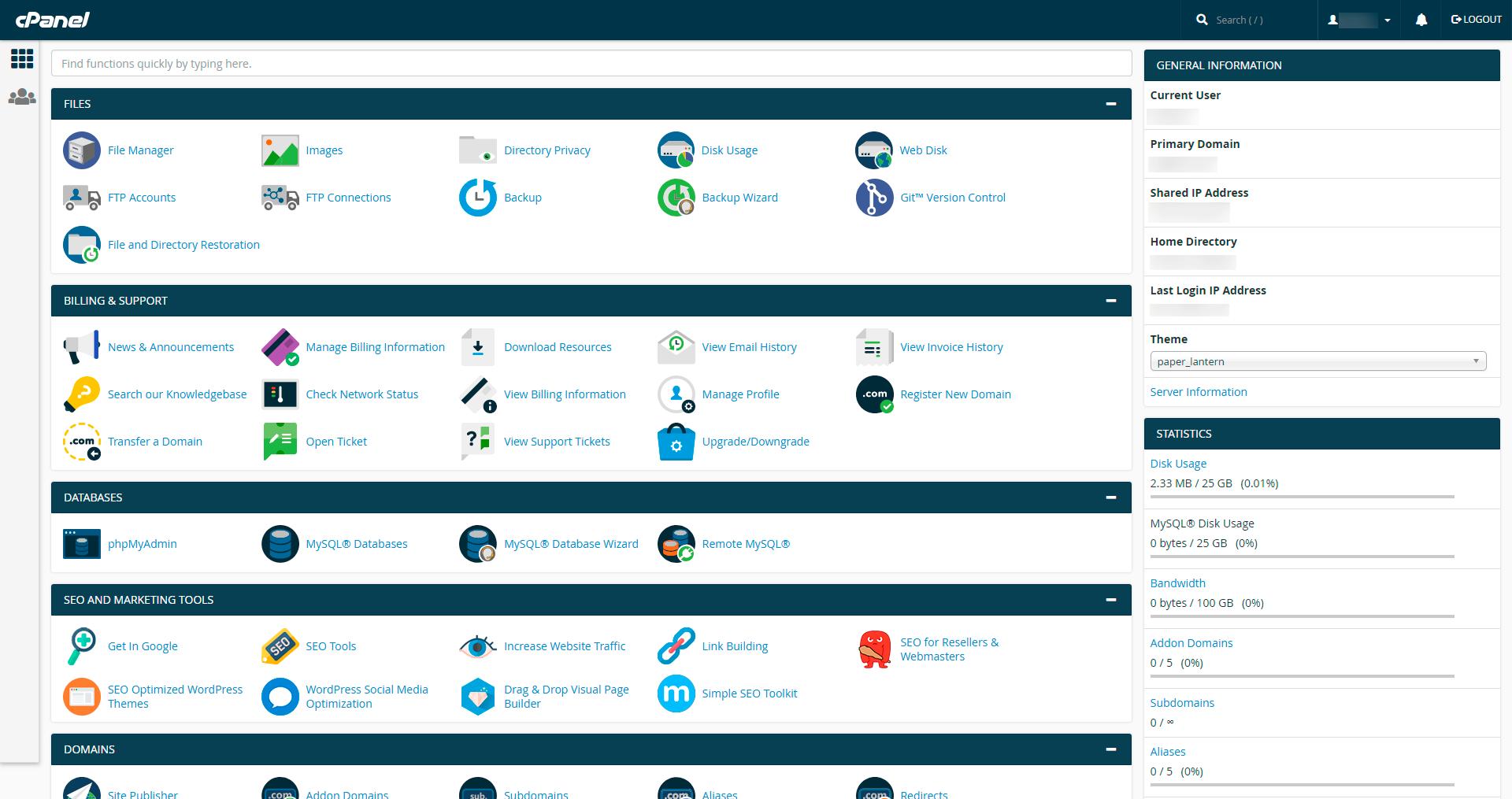
Once your hosting account has been provisioned, you receive login details that allow you to access your cPanel interface.
Behind the scenes, your hosting provider has configured an account on the server with specific permissions, storage allocations, resource limits, and enabled services.
When you log in, cPanel communicates with the hosting environment to display the tools and information available to your account.
For instance, when you open File Manager, cPanel gives you access to your account's directories. When you create a database, it communicates with the database management system to create the necessary database and user permissions.
The same principle applies when creating email accounts, managing domains, or configuring other hosting features.
You are interacting with a control panel, but the actual operations are performed by the underlying server services.
This distinction is important because cPanel does not independently perform every hosting function. It provides the interface through which you manage services running on the server.
3. Your Website Files Are Stored in a Specific Directory
One of the first things you do after purchasing hosting is upload your website files.
These files might include HTML documents, CSS stylesheets, JavaScript files, images, PHP scripts, WordPress files, and other resources required by your website.
But where do they actually go?
On a typical cPanel account, the primary domain's website files are stored inside a directory called public_html.
For example:
/home/username/
    |
    |-- public_html/
    |      |-- index.php
    |      |-- wp-config.php
    |      |-- wp-content/
    |      |-- wp-admin/
    |      |-- wp-includes/
    |
    |-- mail/
    |
    |-- etc/
    |
    |-- logs/
This is a simplified example of a cPanel account directory structure.
The public_html directory is particularly important because it is normally the document root for your primary domain. It contains files that the web server can make publicly accessible.
When someone visits your website, the web server knows which directory to look in based on the domain's configuration.
If your website uses WordPress, for example, the directory contains the WordPress application files, themes, plugins, and other resources.
If you upload a simple HTML website, it might contain an index.html file instead.
The web server uses the domain's document root to locate the requested content and deliver it to visitors.
You can manage these files through cPanel's File Manager or an FTP/SFTP application, depending on the access methods provided by your hosting provider.
4. Your Domain Connects to the Hosting Server Through DNS
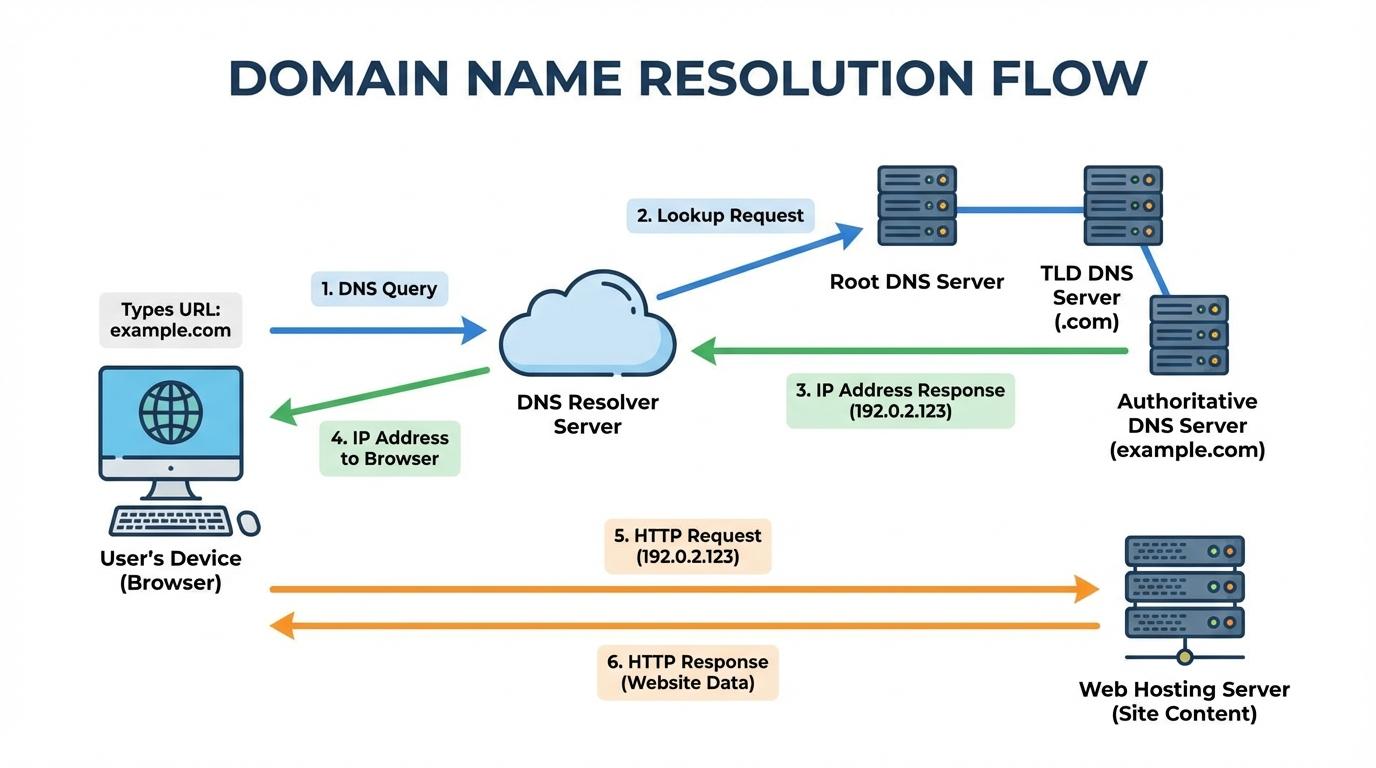
Now that your website files are stored on a server, how does someone visiting your domain know where to find them?
This is where DNS comes in.
DNS stands for Domain Name System. It translates human-readable domain names into IP addresses that computers use to communicate across networks.
For example, when someone enters:
www.example.com
Their browser needs to discover which server should receive the request.
DNS helps provide that information.
When you connect your domain to your hosting account, you typically configure your domain's nameservers or DNS records.
An A record, for example, can point a domain to the IPv4 address of your hosting server.
A simplified process looks like this:
- A visitor enters your domain into their browser.
- The browser or its DNS resolver looks up the domain's DNS records.
- The DNS system returns the relevant IP address.
- The browser uses that IP address to establish a connection with the hosting server.
- The server receives the request and identifies the website associated with the domain.
DNS is therefore an essential part of making your website accessible.
Without correctly configured DNS records, visitors may be unable to reach your website, even when all your website files are safely stored on the hosting server.
It is also worth understanding that DNS and web hosting are separate services. You can register a domain with one company and host your website with another, provided the DNS configuration connects them correctly.
5. The Web Server Receives and Processes Visitors' Requests
This is where things become particularly interesting.
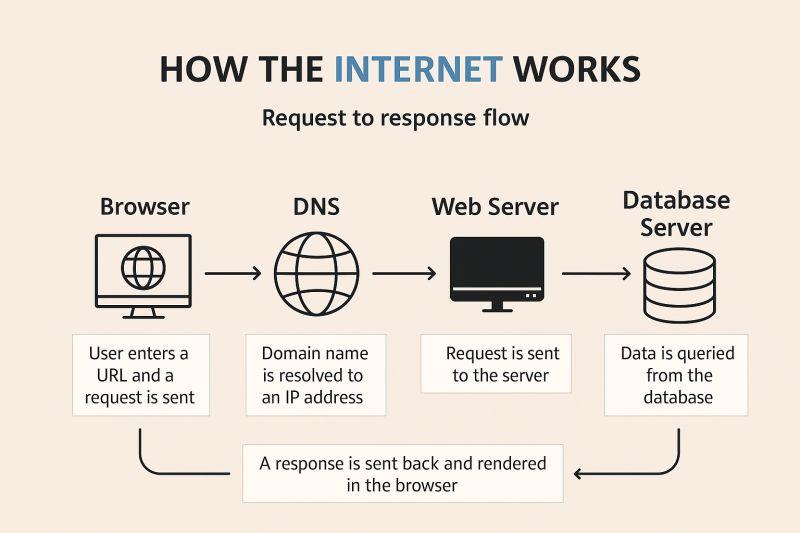
Once your browser has found the hosting server, it sends a request asking for the website's content.
The web server receives that request and determines what needs to happen next.
On many traditional cPanel hosting environments, Apache is used as the web server.
Apache is responsible for receiving HTTP or HTTPS requests, locating the requested resources, and delivering the appropriate responses.
For example, when someone visits your homepage, the server checks the domain configuration and identifies the directory associated with that website.
If the homepage is a static HTML file, Apache can retrieve it and send it directly to the visitor's browser.
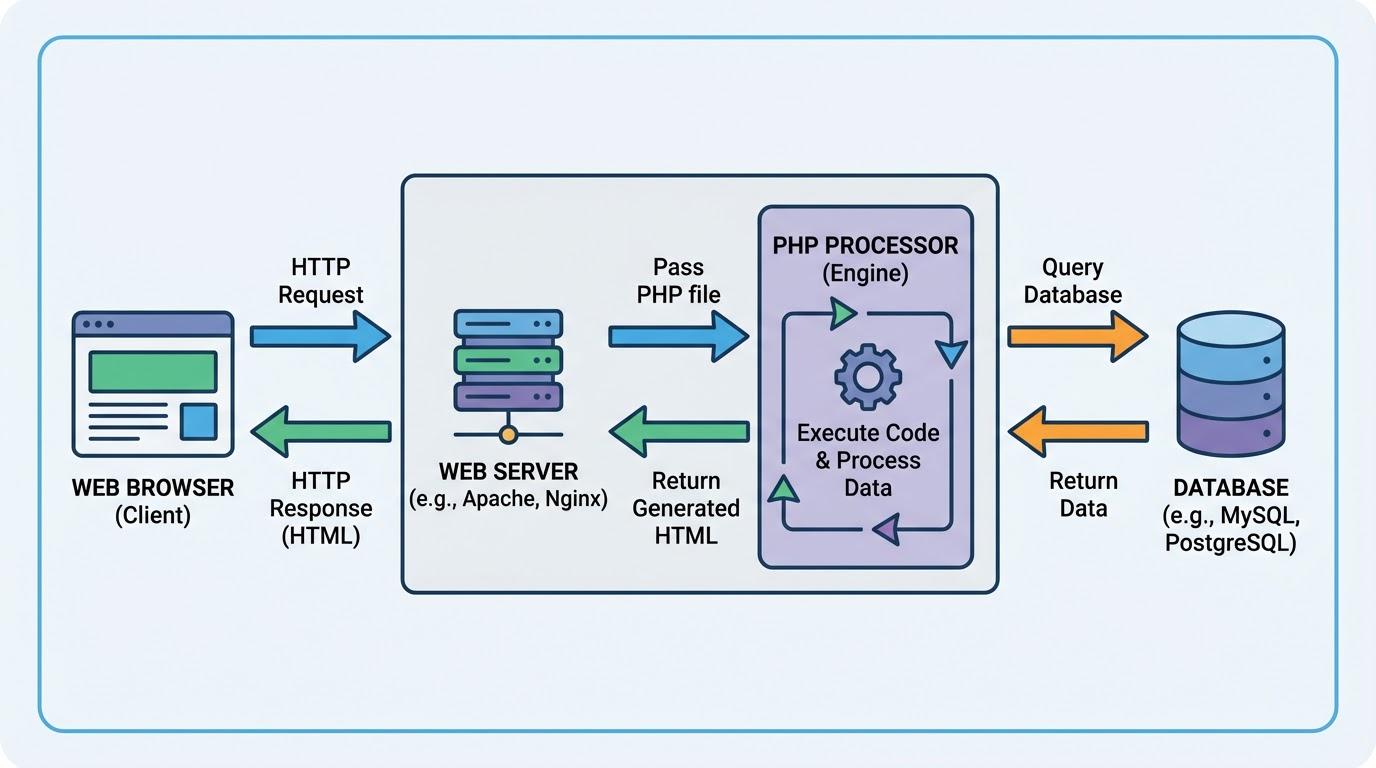
However, if the website uses PHP, such as WordPress, the process involves additional steps.
The server passes the PHP script to the PHP interpreter for execution. The application may then retrieve information from its database, process the request, and generate the HTML content that the browser needs.
The important thing to understand is that the browser does not simply download your entire website from the server.
It requests specific resources, and the server responds with the content needed for each request.
This happens repeatedly as visitors navigate between pages, load images, submit forms, and interact with your website.
6. PHP and Databases Bring Your Website to Life
Not every website works by displaying files that have already been created.
Many websites are dynamic. They generate content based on user activity, database information, and application instructions.
WordPress is a good example.
When someone visits a WordPress website, the server needs to execute PHP code and retrieve the necessary information from the database.
Consider what happens when a visitor opens a blog article.
- The web server receives the request.
- PHP executes the relevant WordPress application code.
- WordPress communicates with its database.
- The database retrieves the requested article, settings, and other information.
- WordPress combines the retrieved information with the active theme and other application components.
- The server generates the HTML response.
- The browser receives and displays the page.
A database stores information such as:
- Blog posts and pages.
- User accounts.
- Website settings.
- Comments.
- Product information.
- Orders and other application data.
This is why databases are so important for websites built with WordPress, online stores, membership platforms, and other dynamic applications.
If the database becomes unavailable or the application cannot connect to it, parts of your website may stop working.
For example, a WordPress website may display a database connection error instead of loading its homepage.
Through cPanel, website owners can create databases, manage database users, and access tools such as phpMyAdmin, where supported.
PHP and database services work together to turn stored application code and information into the pages visitors actually see.
7. SSL Certificates Help Secure the Connection
Have you noticed that some websites begin with https:// rather than http://?
That difference is important.
HTTPS uses TLS encryption to protect communication between a visitor's browser and your website.
When a website has a properly installed and configured SSL/TLS certificate, the browser can establish an encrypted connection with the server.
This helps protect information exchanged between both sides, including login credentials, contact form submissions, and other sensitive information.
For example, when a customer enters their details on an online store, HTTPS helps prevent that information from being transmitted as readable plain text across the connection.
In a cPanel hosting environment, SSL certificates may be installed or managed through tools such as AutoSSL, depending on the hosting provider's configuration.
However, installing an SSL certificate alone does not make an entire website secure. Website owners still need to maintain updated software, use strong passwords, protect their applications, and follow good security practices.
SSL/TLS is one important layer of website security, not a complete security solution.
8. Email, Backups and Other Services Also Run in the Background
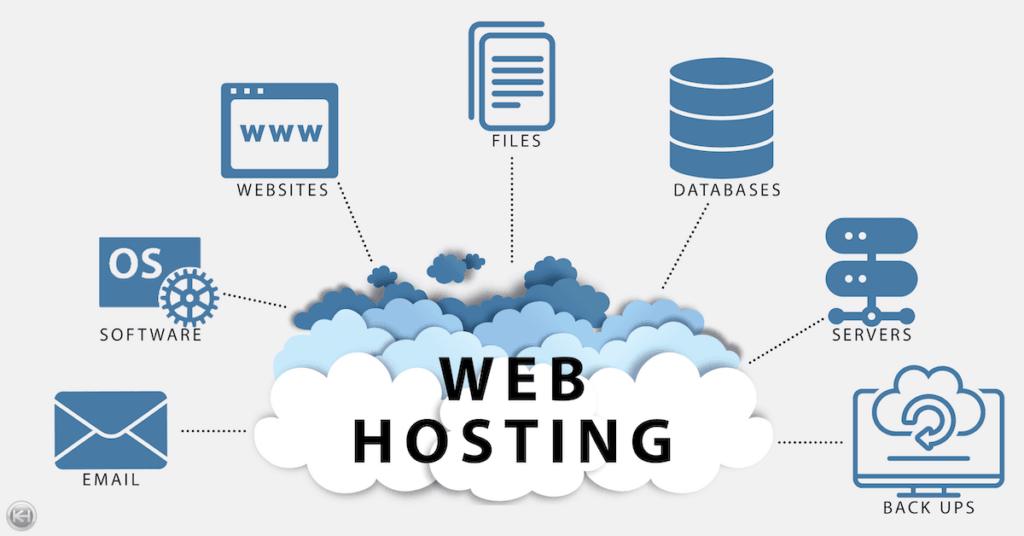
A cPanel hosting account often provides more than just a place to store website files.
Depending on the hosting package and the services enabled by the provider, you may also have access to professional email, backup tools, FTP, DNS management, and other features.
For example, when you create an email address such as info@example.com, cPanel communicates with the server's mail services to create the mailbox and apply its storage and account settings.
When someone sends an email to that address, mail-related DNS records and mail server configurations help direct the message to the appropriate destination.
Backups are another important part of the hosting environment.
A website may contain hundreds or thousands of files alongside databases and email data. If something goes wrong, having a usable backup can make recovery considerably easier.
However, backup availability and frequency depend on the hosting provider and the specific hosting plan.
Some providers offer automatic backups, while others provide tools that allow customers to create their own backups.
This is why it is important to understand exactly what your hosting package includes rather than assuming every cPanel hosting service offers identical features.
9. The Server Manages Multiple Websites and Resources Simultaneously
One thing many website owners do not initially realise is that their website is rarely the only website operating on a shared hosting server.
A single server can host numerous customer accounts, each with different websites, databases, email accounts, and applications.
The server's operating system and hosting environment manage these accounts and allocate resources according to their configurations and hosting limits.
These resources include:
- CPU, which handles processing tasks.
- RAM, which provides working memory for applications.
- Storage, which holds website files, databases, and other data.
- Bandwidth, which supports the transfer of information between the server and visitors.
When a visitor loads a page, your website uses some of the available server resources to process that request.
If several visitors access your website simultaneously, additional processing and memory resources may be required.
This is why hosting resources matter.
A website that performs perfectly with 20 visitors might experience difficulties when hundreds of people attempt to access it simultaneously, particularly if the website is poorly optimised or the hosting resources are insufficient.
The actual performance depends on several factors, including server hardware, software configuration, resource allocation, website optimisation, and traffic patterns.
A cPanel interface may look similar across different hosting companies, but the underlying server infrastructure and performance can be very different.
So, What Actually Happens When Someone Visits Your Website?
Let's bring everything together with a simple example.
Imagine you own an online business and your website is hosted on a cPanel hosting account.
A potential customer enters your domain into their browser.
Here is what happens:
- DNS lookup: The browser discovers the IP address associated with your domain.
- Server connection: The browser connects to your hosting server.
- Request processing: The web server receives the request and identifies the website.
- File retrieval: The server locates the required website files.
- Application execution: If the website uses PHP, the relevant scripts are executed.
- Database communication: The application retrieves any required information from the database.
- Response generation: The server prepares the requested webpage.
- Content delivery: The server sends the response to the visitor's browser.
- Browser rendering: The browser processes the HTML, CSS, JavaScript, images, and other resources to display the page.
All these processes happen behind the scenes, often within seconds.
The next time someone tells you that they simply uploaded their website and it started working, remember that an entire hosting environment is responsible for making that possible.
Does cPanel Determine How Fast Your Website Is?
Not entirely.
This is an important distinction, especially when choosing a hosting provider.
cPanel provides the tools for managing your hosting account, but it does not automatically determine the performance of your website.
Two hosting companies can both offer cPanel hosting while providing very different experiences.
One may use newer server hardware, faster storage, better network connectivity, and more efficient server configurations. Another may operate with older hardware or allocate fewer resources to individual accounts.
Website performance is also affected by factors outside the hosting environment.
For example:
- Poorly optimised images can increase page loading times.
- Excessive WordPress plugins can introduce unnecessary processing.
- Poorly written application code can slow down requests.
- Large databases can affect application performance when queries are inefficient.
- External scripts and third-party services can delay page rendering.
- Insufficient hosting resources can affect performance during traffic spikes.
Therefore, choosing good hosting is important, but website optimisation matters too.
If your website is consistently slow, upgrading your hosting package may help, but it is worth identifying the actual cause before spending money on additional resources.
Final Thoughts
Hosting a website on cPanel involves much more than uploading files and connecting a domain.
Behind the control panel is an entire infrastructure of servers, operating systems, web servers, databases, programming environments, DNS services, and security systems working together to make your website accessible.
cPanel makes managing many of these services considerably easier by providing a central interface for website owners.
Understanding what happens behind the scenes also helps you make better hosting decisions. You become more aware of why server resources matter, why DNS must be configured correctly, why databases are important, and why the quality of your hosting provider can affect your website's overall performance.
If you are looking for a reliable environment to host your website, choosing the right hosting provider is just as important as choosing the right control panel.
At SIRSTEVEHQ, we provide cPanel Hosting for individuals, businesses, and website owners who need a platform to manage their websites, databases, domains, and professional email accounts.
Whether you are launching your first website or moving an existing project to a new hosting environment, explore our cPanel Hosting plans and find a package that suits your requirements.
Your website may look simple to visitors, but there is a lot happening behind the scenes to keep it running.



















Comments (0)
No comments yet. Be the first to comment!